Image-to-video

Image-to-video: first frame

Animate from a single image

  • Basic settings: Choose a duration and resolution based on the model (see the Availability section). Duration values depend on the model: wan2.6 supports any integer from 2 to 15 seconds, while wan2.5 supports only 5 or 10 seconds. The model also supports prompt rewriting and adding watermarks.
  • Audio capabilities: Supports automatic dubbing or uploading audio to achieve audio-video sync. (Supported by wan2.6 and wan2.5)
  • Multi-shot narrative: Generate videos with multiple shots while keeping the main subject consistent across shots. (Supported only by wan2.6)
Quick links: Try it online | API reference

Getting started

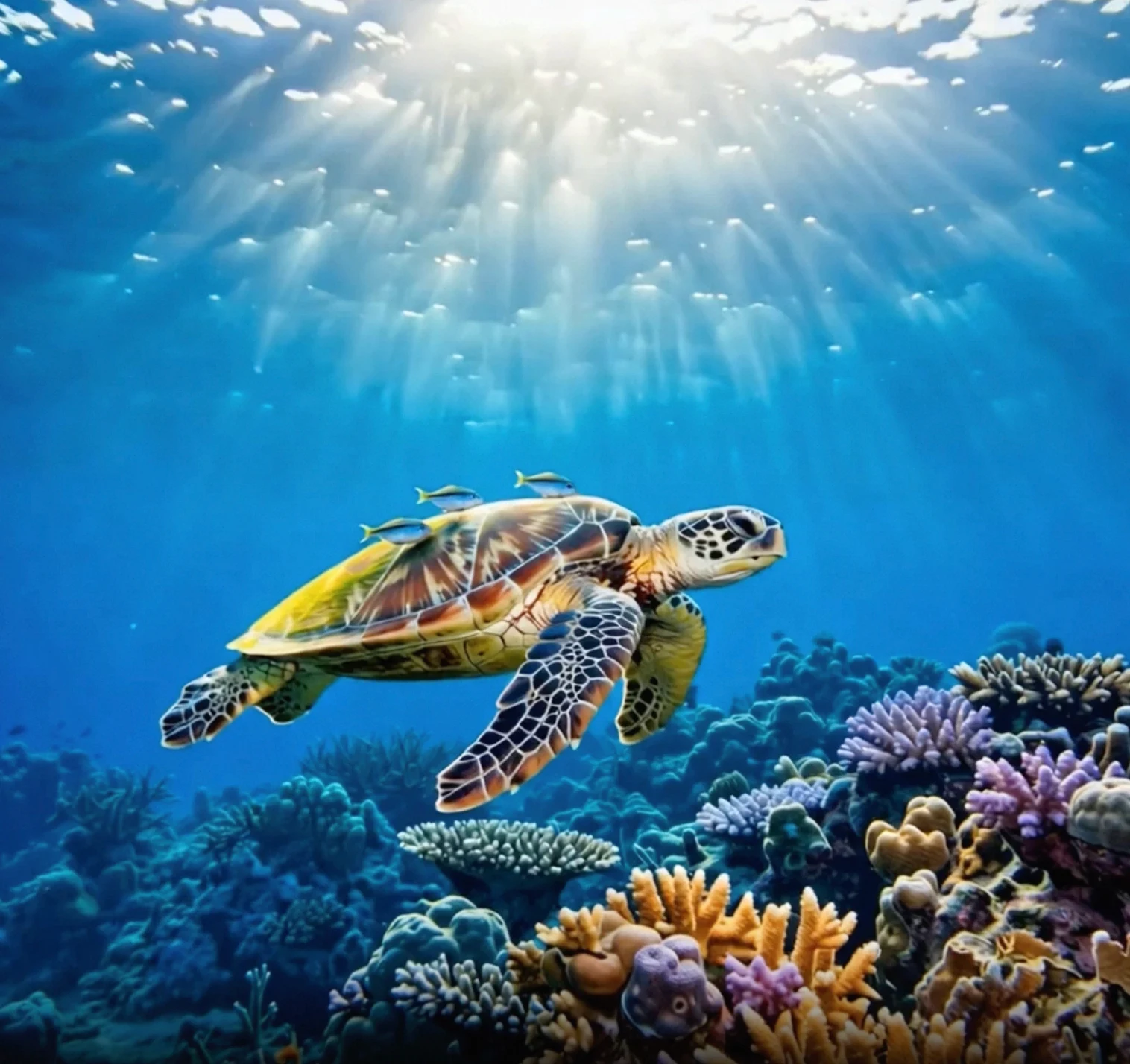
Input promptInput first frameOutput video (multi-shot video with audio)
The camera slowly moves up from below the sea turtle. The turtle swims leisurely, and the details of its belly are clearly visible.
wan-i2v-haigui
Before calling the API, get an API key and set the API key as an environment variable. To use a SDK, install the DashScope SDK. SDK version requirements:
  • DashScope Python SDK: 1.25.8 or later
  • DashScope Java SDK: 2.22.6 or later
If your SDK version is too old, you might encounter errors such as "url error, please check url!". Install the SDK.
import os
from http import HTTPStatus
from dashscope import VideoSynthesis
import dashscope

dashscope.base_http_api_url = 'https://dashscope-intl.aliyuncs.com/api/v1'
api_key = os.getenv("DASHSCOPE_API_KEY", "YOUR_API_KEY")

print('please wait...')
rsp = VideoSynthesis.call(api_key=api_key,
                          model='wan2.6-i2v-flash',
                          prompt='The camera slowly moves up from below the sea turtle. The turtle swims leisurely, and the details of its belly are clearly visible.',
                          img_url="https://help-static-aliyun-doc.aliyuncs.com/file-manage-files/zh-CN/20260121/zlpocv/wan-i2v-haigui.webp",
                          resolution="720P",
                          duration=10,
                          shot_type="multi",
                          prompt_extend=True,
                          watermark=True)
print(rsp)
if rsp.status_code == HTTPStatus.OK:
  print("video_url:", rsp.output.video_url)
else:
  print('Failed, status_code: %s, code: %s, message: %s' % (rsp.status_code, rsp.code, rsp.message))

Availability

Supported models:
ModelFeaturesInput modalitiesOutput video specifications
wan2.6-i2v-flash RecommendedVideo with audio, video without audio. Multi-shot narrative, audio-video syncText, image, audioResolution options: 720P, 1080P. Video duration: [2s, 15s] (integer). Defined specifications: 30 fps, MP4 (H.264 encoding)
wan2.6-i2v RecommendedVideo with audio. Multi-shot narrative, audio-video syncText, image, audioResolution options: 720P, 1080P. Video duration: [2s, 15s] (integer). Defined specifications: 30 fps, MP4 (H.264 encoding)
wan2.5-i2v-previewVideo with audio. Audio-video syncText, image, audioResolution options: 480P, 720P, 1080P. Video duration: 5s, 10s. Defined specifications: 30 fps, MP4 (H.264 encoding)
wan2.2-i2v-flashVideo without audio. 50% faster than model 2.1Text, imageResolution options: 480P, 720P, 1080P. Video duration: 5s. Defined specifications: 30 fps, MP4 (H.264 encoding)
wan2.2-i2v-plusVideo without audio. This model offers comprehensive improvements in stability and success rate over model 2.1.Text, imageResolution options: 480P, 1080P. Video duration: 5s. Defined specifications: 30 fps, MP4 (H.264 encoding)
wan2.1-i2v-plusVideo without audioText, imageResolution options: 720P. Video duration: 5s. Defined specifications: 30 fps, MP4 (H.264 encoding)
wan2.1-i2v-turboVideo without audioText, imageResolution options: 480P, 720P. Video duration: 3s, 4s, 5s. Defined specifications: 30 fps, MP4 (H.264 encoding)

Core features

Create multi-shot videos

Models: wan2.6-i2v-flash, wan2.6-i2v. Introduction: Automatically switches shots, such as from a wide shot to a close-up. This feature is suitable for creating MVs and other scenarios. Parameter settings:
  • shot_type: Must be "multi".
  • prompt_extend: Must be true to enable intelligent rewriting for optimized shot descriptions.
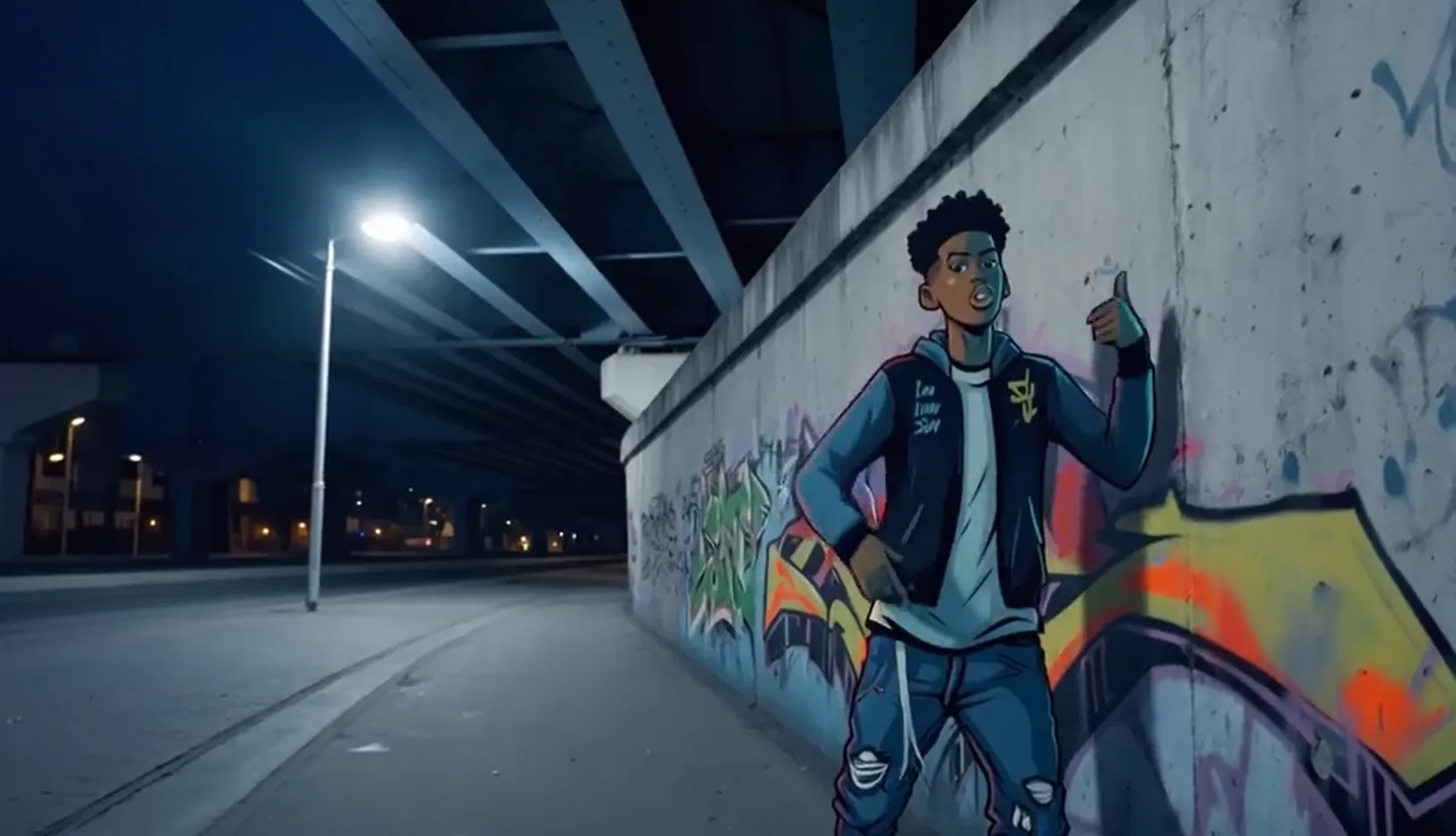
Input promptInput first frameOutput video (wan2.6, multi-shot video)
A scene of urban fantasy art. A dynamic graffiti art character. A boy made of spray paint comes to life on a concrete wall. He performs an English rap at high speed while striking a classic, energetic rapper pose. The scene is set at night under an urban railway bridge. The lighting comes from a single street lamp, creating a cinematic atmosphere full of high energy and amazing detail. The audio of the video consists entirely of the rap, with no other dialogue or noise.
rap
Input audio:
Make sure that your DashScope SDK version is up to date:
  • Python SDK: 1.25.8 or later
  • Java SDK: 2.22.6 or later
Install the SDK.
import os
from http import HTTPStatus
from dashscope import VideoSynthesis
import dashscope

dashscope.base_http_api_url = 'https://dashscope-intl.aliyuncs.com/api/v1'

# If you have not configured the environment variable, replace the following line with your API key: api_key="sk-xxx"
api_key = os.getenv("DASHSCOPE_API_KEY")

def sample_async_call_i2v():
  # Asynchronous call, returns a task_id
  rsp = VideoSynthesis.async_call(api_key=api_key,
                  model='wan2.6-i2v-flash',
                  prompt='A scene of urban fantasy art. A dynamic graffiti art character. A boy made of spray paint comes to life on a concrete wall. He performs an English rap at high speed while striking a classic, energetic rapper pose. The scene is set at night under an urban railway bridge. The lighting comes from a single street lamp, creating a cinematic atmosphere full of high energy and amazing detail. The audio of the video consists entirely of the rap, with no other dialogue or noise.',
                  img_url="https://help-static-aliyun-doc.aliyuncs.com/file-manage-files/zh-CN/20250925/wpimhv/rap.png",
                  audio_url="https://help-static-aliyun-doc.aliyuncs.com/file-manage-files/zh-CN/20250925/ozwpvi/rap.mp3",
                  resolution="720P",
                  duration=10,
                  shot_type="multi", # Multi-shot
                  prompt_extend=True,
                  watermark=True,
                  negative_prompt="",
                  seed=12345)
  print(rsp)
  if rsp.status_code == HTTPStatus.OK:
    print("task_id: %s" % rsp.output.task_id)
  else:
    print('Failed, status_code: %s, code: %s, message: %s' % (rsp.status_code, rsp.code, rsp.message))

  # Wait for the asynchronous task to complete
  rsp = VideoSynthesis.wait(task=rsp, api_key=api_key)
  print(rsp)
  if rsp.status_code == HTTPStatus.OK:
    print(rsp.output.video_url)
  else:
    print('Failed, status_code: %s, code: %s, message: %s' % (rsp.status_code, rsp.code, rsp.message))


if __name__ == '__main__':
  sample_async_call_i2v()

Audio-video synchronization

Models: wan2.6-i2v-flash, wan2.6-i2v, wan2.5-i2v-preview. Introduction: Animates characters in photos to speak or sing, with lip movements that match the audio. For more examples, see Sound generation. Parameter settings:
  • Provide an audio file: Pass the audio_url. The model will align the lip movements based on the audio file.
  • Automatic dubbing: Do not pass an audio_url. The model outputs a video with audio by default. It automatically generates background sound effects, music, or vocals based on the visuals.
Input promptInput first frameOutput video (with audio)
A scene of urban fantasy art. A dynamic graffiti art character. A boy made of spray paint comes to life on a concrete wall. He performs an English rap at high speed while striking a classic, energetic rapper pose. The scene is set at night under an urban railway bridge. The lighting comes from a single street lamp, creating a cinematic atmosphere full of high energy and amazing detail. The audio of the video consists entirely of the rap, with no other dialogue or noise.
rap
Input audio:
Make sure that your DashScope SDK version is up to date:
  • Python SDK: 1.25.8 or later
  • Java SDK: 2.22.6 or later
Install the SDK.
import os
from http import HTTPStatus
from dashscope import VideoSynthesis
import dashscope

dashscope.base_http_api_url = 'https://dashscope-intl.aliyuncs.com/api/v1'

# If you have not configured the environment variable, replace the following line with your API key: api_key="sk-xxx"
api_key = os.getenv("DASHSCOPE_API_KEY")

def sample_async_call_i2v():
  # Asynchronous call, returns a task_id
  rsp = VideoSynthesis.async_call(api_key=api_key,
                  model='wan2.6-i2v-flash',
                  prompt='A scene of urban fantasy art. A dynamic graffiti art character. A boy made of spray paint comes to life on a concrete wall. He performs an English rap at high speed while striking a classic, energetic rapper pose. The scene is set at night under an urban railway bridge. The lighting comes from a single street lamp, creating a cinematic atmosphere full of high energy and amazing detail. The audio of the video consists entirely of the rap, with no other dialogue or noise.',
                  img_url="https://help-static-aliyun-doc.aliyuncs.com/file-manage-files/zh-CN/20250925/wpimhv/rap.png",
                  audio_url="https://help-static-aliyun-doc.aliyuncs.com/file-manage-files/zh-CN/20250925/ozwpvi/rap.mp3",
                  resolution="720P",
                  duration=10,
                  prompt_extend=True,
                  watermark=True,
                  negative_prompt="",
                  seed=12345)
  print(rsp)
  if rsp.status_code == HTTPStatus.OK:
    print("task_id: %s" % rsp.output.task_id)
  else:
    print('Failed, status_code: %s, code: %s, message: %s' % (rsp.status_code, rsp.code, rsp.message))

  # Wait for the asynchronous task to complete
  rsp = VideoSynthesis.wait(task=rsp, api_key=api_key)
  print(rsp)
  if rsp.status_code == HTTPStatus.OK:
    print(rsp.output.video_url)
  else:
    print('Failed, status_code: %s, code: %s, message: %s' % (rsp.status_code, rsp.code, rsp.message))


if __name__ == '__main__':
  sample_async_call_i2v()
curl Step 1: Create a task to obtain the task ID
  • Provide an audio file
  • Automatic dubbing
curl --location 'https://dashscope-intl.aliyuncs.com/api/v1/services/aigc/video-generation/video-synthesis' \
  -H 'X-DashScope-Async: enable' \
  -H "Authorization: Bearer $DASHSCOPE_API_KEY" \
  -H 'Content-Type: application/json' \
  -d '{
  "model": "wan2.5-i2v-preview",
  "input": {
    "prompt": "A scene of urban fantasy art. A dynamic graffiti art character. A boy made of spray paint comes to life from a concrete wall. He raps an English song at high speed while striking a classic, energetic rapper pose. The scene is set under an urban railway bridge at night. The lighting comes from a single street lamp, creating a cinematic atmosphere full of high energy and amazing detail. The audio of the video consists entirely of his rap, with no other dialogue or noise.",
    "img_url": "https://help-static-aliyun-doc.aliyuncs.com/file-manage-files/zh-CN/20250925/wpimhv/rap.png",
    "audio_url": "https://help-static-aliyun-doc.aliyuncs.com/file-manage-files/zh-CN/20250925/ozwpvi/rap.mp3"
  },
  "parameters": {
    "resolution": "480P",
    "prompt_extend": true,
    "duration": 10
  }
}'
Step 2: Retrieve the result using the task ID Replace {task_id} with the task_id value returned by the previous API call.
curl -X GET https://dashscope-intl.aliyuncs.com/api/v1/tasks/{task_id} \
--header "Authorization: Bearer $DASHSCOPE_API_KEY"

Generate videos without audio

Models: wan2.6-i2v-flash, wan2.2 and earlier models. Introduction: Suitable for visual-only scenarios that do not require audio, such as dynamic posters and silent short videos. Parameter settings:
  • wan2.6-i2v-flash: By default, this model generates a video with audio. To generate a video without audio, you must explicitly set audio=false. Even if you pass an audio_url, the output is a silent video as long as audio=false. For pricing details, see wan2.6-i2v-flash pricing.
  • wan2.2 and earlier models: These models generate silent videos by default, with no extra configuration needed.
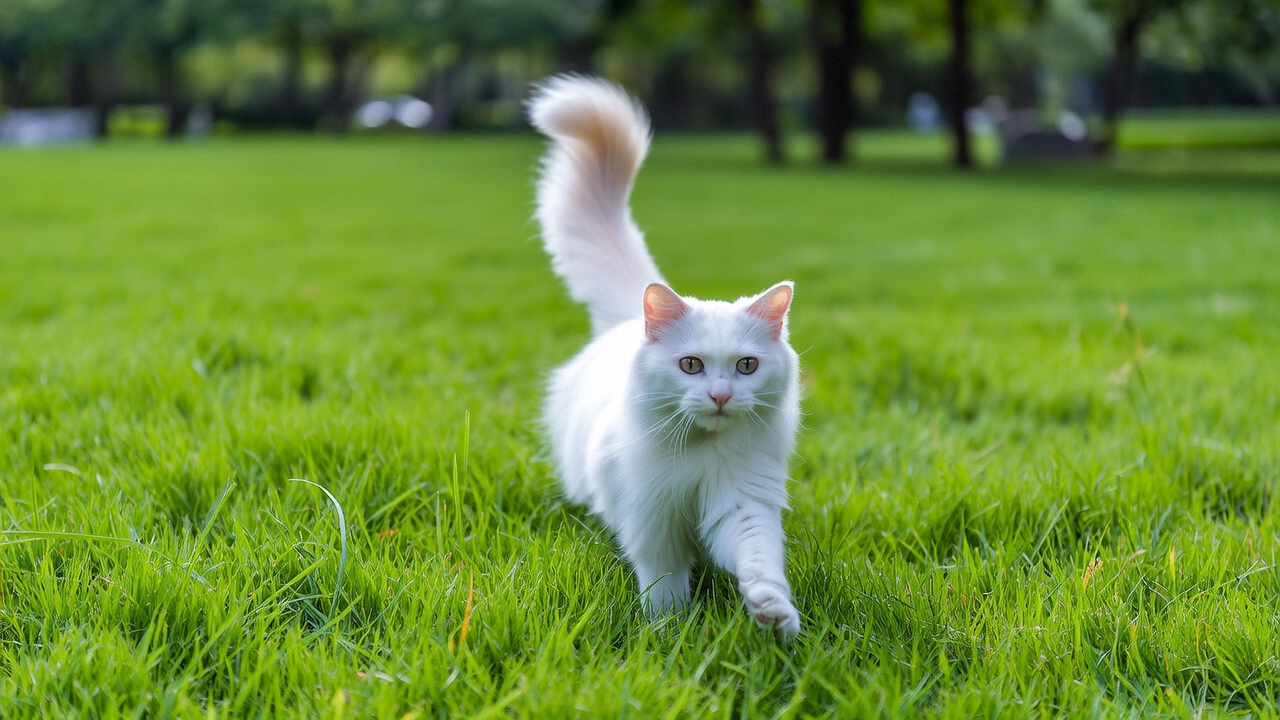
PromptInput first frameOutput video (without audio)
A cat running on the grass
image
Make sure that your DashScope SDK version is up to date:
  • Python SDK: 1.25.8 or later
  • Java SDK: 2.22.6 or later
Install the SDK.
import os
from http import HTTPStatus
from dashscope import VideoSynthesis
import dashscope

dashscope.base_http_api_url = 'https://dashscope-intl.aliyuncs.com/api/v1'

# If you have not configured the environment variable, replace the following line with your API key: api_key="sk-xxx"
api_key = os.getenv("DASHSCOPE_API_KEY")

def sample_async_call_i2v():
  # Asynchronous call, returns a task_id
  rsp = VideoSynthesis.async_call(api_key=api_key,
                  model='wan2.6-i2v-flash',
                  prompt='A cat running on the grass',
                  img_url="https://cdn.translate.alibaba.com/r/wanx-demo-1.png",
                  audio=False,   # Must be explicitly set to False to output a video without audio
                  resolution="720P",
                  duration=5,
                  prompt_extend=True,
                  watermark=True,
                  negative_prompt="",
                  seed=12345)
  print(rsp)
  if rsp.status_code == HTTPStatus.OK:
    print("task_id: %s" % rsp.output.task_id)
  else:
    print('Failed, status_code: %s, code: %s, message: %s' % (rsp.status_code, rsp.code, rsp.message))

  # Wait for the asynchronous task to complete
  rsp = VideoSynthesis.wait(task=rsp, api_key=api_key)
  print(rsp)
  if rsp.status_code == HTTPStatus.OK:
    print(rsp.output.video_url)
  else:
    print('Failed, status_code: %s, code: %s, message: %s' % (rsp.status_code, rsp.code, rsp.message))


if __name__ == '__main__':
  sample_async_call_i2v()
curl Step 1: Create a task to obtain the task ID
  • wan2.6-i2v-flash
  • wan2.2 and earlier models
curl --location 'https://dashscope-intl.aliyuncs.com/api/v1/services/aigc/video-generation/video-synthesis' \
  -H 'X-DashScope-Async: enable' \
  -H "Authorization: Bearer $DASHSCOPE_API_KEY" \
  -H 'Content-Type: application/json' \
  -d '{
  "model": "wan2.6-i2v-flash",
  "input": {
    "prompt": "A cat running on the grass",
    "img_url": "https://cdn.translate.alibaba.com/r/wanx-demo-1.png"
  },
  "parameters": {
    "audio": false,
    "resolution": "720P",
    "prompt_extend": true,
    "watermark": true,
    "duration": 5
  }
}'
Step 2: Retrieve the result using the task ID Replace {task_id} with the task_id value returned by the previous API call.
curl -X GET https://dashscope-intl.aliyuncs.com/api/v1/tasks/{task_id} \
--header "Authorization: Bearer $DASHSCOPE_API_KEY"

How to provide images and audio

Input image

  • Number: 1.
  • Input methods: Public image URL, local file path, or Base64-encoded string.
The file path requirements differ slightly for Python and Java. On Windows: Python uses two slashes (file://), while Java uses three (file:///). Follow the rules below carefully.Python SDK: Supports absolute and relative paths. The file path rules are as follows:
Operating systemInput File PathExample (absolute path)Example (relative path)
Linux / macOSfile:// + absolute or relative pathfile:///home/images/test.pngfile://./images/test.png
Windowsfile:// + absolute or relative pathfile://D:/images/test.pngfile://./images/test.png
Java SDK: Supports absolute paths only. The file path rules are as follows:
Operating systemInput file pathExample (absolute path)
Linux / macOSfile:// + absolute pathfile:///home/images/test.png
Windowsfile:/// + absolute pathfile:///D:/images/test.png
  • Example: data:image/png;base64,iVBORw0KGgoAAAANSUhEUgAABDg...... (The example is truncated for demonstration purposes only).
  • Format requirement: Follow the data:<MIME_type>;base64,<base64_data> format, where:
    • <base64_data>: The Base64-encoded string of the image file.
    • <MIME_type>: The media type of the image, which must correspond to the file format.
      Image formatMIME type
      JPEGimage/jpeg
      JPGimage/jpeg
      PNGimage/png
      BMPimage/bmp
      WEBPimage/webp

Example code: Three input methods

import base64
import os
from http import HTTPStatus
from dashscope import VideoSynthesis
import mimetypes
import dashscope

dashscope.base_http_api_url = 'https://dashscope-intl.aliyuncs.com/api/v1'


# If you haven't configured the environment variable, replace the next line with your API key: api_key="sk-xxx"
api_key = os.getenv("DASHSCOPE_API_KEY")

# --- Helper function: For Base64 encoding ---
# Format: data:{MIME_type};base64,{base64_data}
def encode_file(file_path):
  mime_type, _ = mimetypes.guess_type(file_path)
  if not mime_type or not mime_type.startswith("image/"):
    raise ValueError("Unsupported or unrecognized image format")
  with open(file_path, "rb") as image_file:
    encoded_string = base64.b64encode(image_file.read()).decode('utf-8')
  return f"data:{mime_type};base64,{encoded_string}"

"""
Image input methods:
Choose one of the following three methods:

1. Use a public URL - Suitable for publicly accessible images
2. Use a local file - Suitable for local development and testing
3. Use Base64 encoding - Suitable for private images or scenarios requiring encrypted transmission
"""

# [Method 1] Use a publicly accessible image URL
# Example: Use a public image URL
img_url = "https://help-static-aliyun-doc.aliyuncs.com/file-manage-files/zh-CN/20250925/wpimhv/rap.png"

# [Method 2] Use a local file (supports absolute and relative paths)
# Format requirement: file:// + file path
# Example (absolute path):
# img_url = "file://" + "/path/to/your/img.png"    # Linux/macOS
# img_url = "file://" + "/C:/path/to/your/img.png"  # Windows
# Example (relative path):
# img_url = "file://" + "./img.png"                # Relative to the current executable file's path

# [Method 3] Use a Base64-encoded image
# img_url = encode_file("./img.png")

# Set audio URL
audio_url = "https://help-static-aliyun-doc.aliyuncs.com/file-manage-files/zh-CN/20250925/ozwpvi/rap.mp3"

def sample_call_i2v():
  # Synchronous call, returns result directly
  print('please wait...')
  rsp = VideoSynthesis.call(api_key=api_key,
                              model='wan2.6-i2v-flash',
                              prompt='A scene of urban fantasy art. A dynamic graffiti art character. A boy made of spray paint comes to life from a concrete wall. He raps an English song at high speed while striking a classic, energetic rapper pose. The scene is set under an urban railway bridge at night. The lighting comes from a single street lamp, creating a cinematic atmosphere full of high energy and amazing detail. The audio of the video consists entirely of his rap, with no other dialogue or noise.',
                              img_url=img_url,
                              audio_url=audio_url,
                              resolution="720P",
                              duration=10,
                              prompt_extend=True,
                              watermark=False,
                              negative_prompt="",
                              seed=12345)
  print(rsp)
  if rsp.status_code == HTTPStatus.OK:
    print("video_url:", rsp.output.video_url)
  else:
    print('Failed, status_code: %s, code: %s, message: %s' %
              (rsp.status_code, rsp.code, rsp.message))


if __name__ == '__main__':
  sample_call_i2v()

Input audio

  • Number: 1.
  • Input method: Only publicly accessible URLs (HTTP or HTTPS) are supported—local file paths and Base64 encoding are not supported.
  • Audio file constraints:
    • Format: wav, mp3
    • Duration: 3–30 seconds
    • File size: Up to 15 MB
    • If the audio exceeds the video duration, it is truncated. If the audio is shorter, the remaining video is silent.

Output video

  • Number: 1.
  • Output video specifications: Output specifications vary by model, see Availability.
  • Output video URL validity: 24 hours.
  • Output video dimensions: The dimensions are determined by the input image and the resolution setting.
    • The model tries to maintain the aspect ratio of the input image while scaling it to a total pixel count close to the target value. Because of encoding standards, the width and height must be divisible by 16, so the model automatically adjusts the dimensions slightly.
    • For example, if the input image is 750 x 1000 (aspect ratio 3:4 = 0.75) and you set resolution = "720P" (target pixel count is about 920,000), the final output might be 816 x 1104 (aspect ratio approximately 0.739, total pixels approximately 900,000), where both width and height are multiples of 16.

Billing and rate limits

  • For the free quota and unit price, see Model pricing.
  • For rate limits, see Wan series.
  • Billing details:
    • Billing is based on the duration in seconds of the successfully generated video.
    • Failed model calls or processing errors do not incur fees or consume the free quota for new users.

API reference

Wan - image-to-video - first frame API reference

FAQ

Why can't I directly set the video aspect ratio (such as 16:9)?

The current API does not support directly specifying the video aspect ratio. You can only set the video's resolution using the resolution parameter. The resolution parameter controls the total number of pixels in the video, not a fixed ratio. The model prioritizes preserving the original aspect ratio of the initial input image and makes minor adjustments to meet video encoding requirements. Both width and height must be multiples of 16.

SDK error: "url error, please check url!"

Make sure that:
  • Your DashScope Python SDK version is 1.25.8 or later.
  • Your DashScope Java SDK version is 2.22.6 or later.
If your SDK version is too old, you might encounter the "url error, please check url!" error. For more information about upgrading the SDK, see Upgrade the SDK.