

Repaint, extend, and edit
Quick links: API reference: wan2.7, wan2.1
Edit videos at up to 1080P using text prompts and optional reference images -- change styles, replace objects, or transfer content from reference images into the source video. Uses a single unified model with no
Replace objects in a video using a reference image:
The
Description: Supports up to 3 reference images, including subjects and backgrounds (people, animals, clothing, scenes). The model merges the images to generate coherent video content.
Parameter settings:
Before calling the API, get an API key. Then set your API key as an environment variable.
Description: Extracts the subject's pose and motion, composition and motion contours, or sketch structure from an input video. Then combines this with a text prompt to generate a new video with the same dynamic features. You can also replace the subject with a reference image.
Parameter settings:
Description: Performs fine-grained editing on specified video areas. Supports adding, deleting, and modifying elements, or replacing subjects and backgrounds. Upload a mask image to specify the editing area -- the model automatically tracks the target and blends the generated content.
Parameter settings:
Description: Predicts and generates continuous content based on an input image or video clip. Supports extending a video forward from the first frame or clip, or backward from the last frame or clip. The generated video is 5 seconds long.
Parameter settings:
Description: Expands video frame content proportionally in all directions (top, bottom, left, right) based on a prompt. Maintains video subject continuity and ensures a natural blend with the background.
Parameter settings:
Supports a maximum of 3 reference images. If you provide more than 3, only the first 3 are used. For best results, use a solid background for the subject image to highlight the subject better, and ensure the background image does not contain subject objects.
If the text description is inconsistent with the input video content, the model may misinterpret your request. In this case, we recommend manually disabling prompt rewriting by setting
Specify either a mask image using
Wan 2.7 video editing
Edit videos at up to 1080P using text prompts and optional reference images -- change styles, replace objects, or transfer content from reference images into the source video. Uses a single unified model with no function parameter.
Before running the SDK examples below, ensure your DashScope SDK is up to date: Python 1.25.16 or later, Java 2.22.14 or later.
Parameters (wan2.7)
| Parameter | Type | Required | Description |
|---|---|---|---|
model | string | Yes | "wan2.7-videoedit" |
input.prompt | string | No | Up to 5,000 characters. Describe the desired edit. |
input.negative_prompt | string | No | Up to 500 characters. Content to exclude. |
input.media | array | Yes | Must include one video item. Optionally include up to 4 reference_image items. |
parameters.resolution | string | No | "720P" or "1080P" (default). |
parameters.ratio | string | No | "16:9", "9:16", "1:1", "4:3", "3:4". Defaults to input video ratio. |
parameters.duration | integer | No | 0 = full input duration (default). 2-10 = truncate input video. |
parameters.audio_setting | string | No | "auto" (default, model decides) or "origin" (keep original audio). |
parameters.prompt_extend | boolean | No | Default: true. |
parameters.watermark | boolean | No | Default: false. |
Example: Change video style
- curl
- Python
Step 1: Create a taskStep 2: Get the result using the task IDReplace
{task_id} with the task_id value returned by the previous API call.Example: Edit with reference image
Replace objects in a video using a reference image:
Wan 2.1 video editing (VACE)
The wan2.1-vace-plus model supports 5 specialized editing functions, each selected via the function parameter.
Core capabilities
Multi-image reference
Description: Supports up to 3 reference images, including subjects and backgrounds (people, animals, clothing, scenes). The model merges the images to generate coherent video content.
Parameter settings:
function: Must beimage_reference.ref_images_url: An array of URLs. Supports 1 to 3 reference images.obj_or_bg: Identifies each image as a subject (obj) or background (bg). The length of this array must be the same as the length of theref_images_urlarray.
| Input prompt | Input reference image 1 (Reference subject) | Input reference image 2 (Reference background) | Output video |
|---|---|---|---|
| In the video, a girl walks out from the depths of an ancient, misty forest. Her steps are light, and the camera captures her every graceful moment. When she stops and looks around at the lush trees, a smile of surprise and joy blossoms on her face. This scene, frozen in a moment of intertwined light and shadow, records her wonderful encounter with nature. | 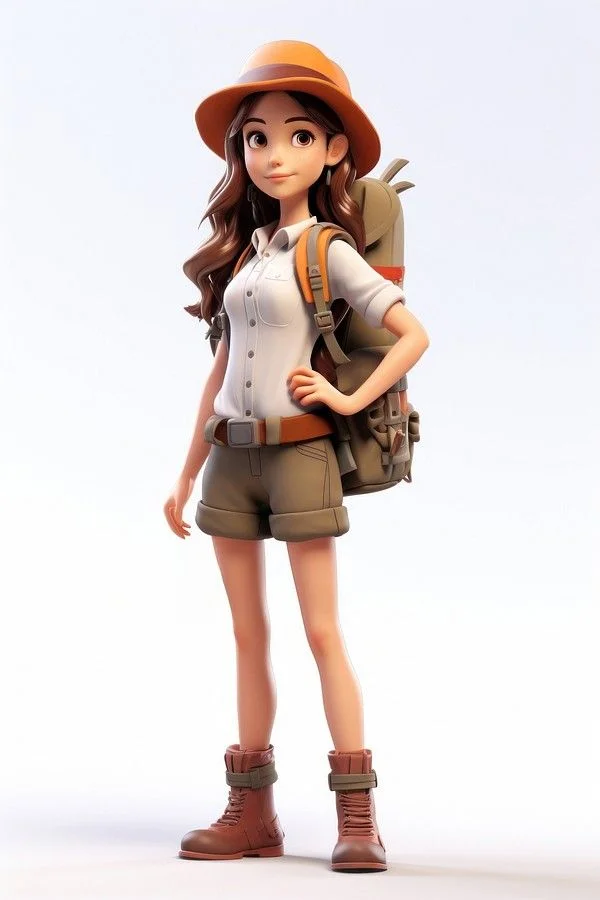 | 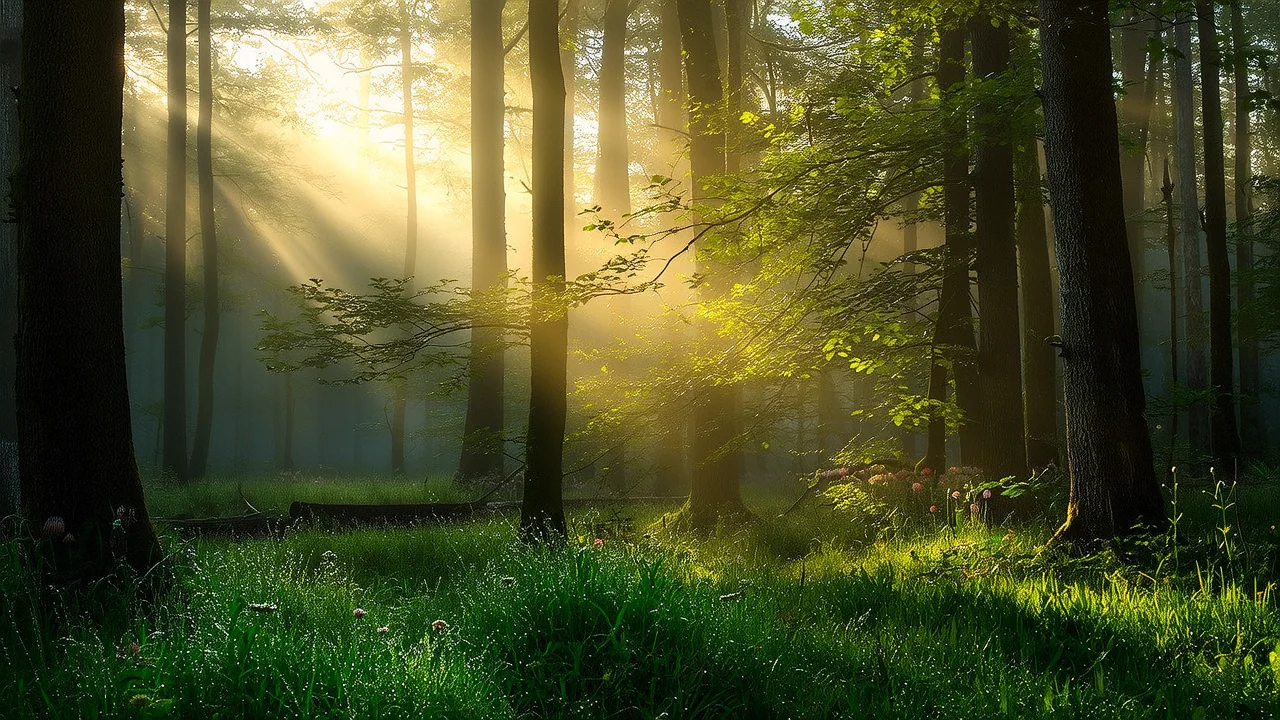 | Output video |
- curl
- Python
- Java
Step 1: Create a task to get the task IDStep 2: Get the result using the task IDReplace
{task_id} with the task_id value returned by the previous API call.Video repainting
Description: Extracts the subject's pose and motion, composition and motion contours, or sketch structure from an input video. Then combines this with a text prompt to generate a new video with the same dynamic features. You can also replace the subject with a reference image.
Parameter settings:
function: Must bevideo_repainting.video_url: Required. The URL of the input video. Must be MP4 format, no larger than 50 MB, and no longer than 5 seconds.control_condition: Optional. Video feature extraction method. This determines which features from the original video are retained:posebodyface: Extracts facial expressions and body movements. Retains facial expression details.posebody: Extracts only body movements, without the face. Controls only body motion.depth: Extracts composition and motion contours. Retains the scene structure.scribble: Extracts the sketch structure. Retains sketch edge details.
strength: Optional. Controls feature extraction strength. Range: 0.0--1.0. Default: 1.0. Higher values make the output more similar to the original; lower values allow more creative freedom.ref_images_url: Optional. URL of a reference image to replace the subject in the input video.
| Input prompt | Input video | Output video |
|---|---|---|
| The video shows a black steampunk-style car driven by a gentleman, adorned with gears and copper pipes. The background is a steam-powered candy factory with retro elements, creating a vintage and playful scene. | Input video | Output video |
- curl
- Python
- Java
Step 1: Create a task to get the task IDStep 2: Get the result using the task IDReplace
{task_id} with the task_id value returned by the previous API call.Local editing
Description: Performs fine-grained editing on specified video areas. Supports adding, deleting, and modifying elements, or replacing subjects and backgrounds. Upload a mask image to specify the editing area -- the model automatically tracks the target and blends the generated content.
Parameter settings:
function: Must bevideo_edit.video_url: Required. The URL of the original input video.mask_image_url: Optional. Specify either this parameter ormask_video_url. We recommend using this parameter. The URL of a mask image. White areas of the mask are edited; black areas remain unchanged.mask_frame_id: Optional. Use withmask_image_urlto specify which video frame the mask corresponds to. Default: first frame.mask_type: Optional. Specifies the behavior of the editing area:tracking(default): The editing area automatically follows the target's motion trajectory.fixed: The editing area stays in a fixed position.
expand_ratio: Optional. Only effective whenmask_typeistracking.- The ratio by which the mask area expands outward. Range: 0.0--1.0. Default: 0.05.
- Lower values fit the target more closely; higher values expand the mask area.
size: Optional. Output resolution aswidth*height(e.g.,1280*720).ref_images_url: Optional. URL of a reference image. Content in the editing area is replaced with the reference image content.
| Input prompt | Input video | Input mask image | Output video |
|---|---|---|---|
| The video shows a Parisian-style French cafe where a lion in a suit is elegantly sipping coffee. It holds a coffee cup in one hand, taking a gentle sip with a relaxed expression. The cafe is tastefully decorated, with soft tones and warm lighting illuminating the area where the lion is. | Input video |  | Output video |
- curl
- Python
- Java
Step 1: Create a task to get the task IDStep 2: Get the result using the task IDReplace
{task_id} with the task_id value returned by the previous API call.Video extension
Description: Predicts and generates continuous content based on an input image or video clip. Supports extending a video forward from the first frame or clip, or backward from the last frame or clip. The generated video is 5 seconds long.
Parameter settings:
function: Must bevideo_extension.prompt: Required. A description of the desired extended content.first_clip_url: Optional. The URL of the first video clip (3 seconds or shorter). The model generates the rest of the video based on this clip.last_clip_url: Optional. The URL of the last video clip (3 seconds or shorter). The model generates the preceding content based on this clip.first_frame_url: Optional. The URL of the first frame image. The video extends forward from this frame.last_frame_url: Optional. The URL of the last frame image. Generation proceeds backward from this frame.
Specify at least one of the following:
first_clip_url, last_clip_url, first_frame_url, or last_frame_url.| Input prompt | Input first clip video (1 second) | Output video (Extended video is 5 seconds) |
|---|---|---|
| A dog wearing sunglasses is skateboarding on the street, 3D cartoon. | Input video | Output video |
- curl
- Python
- Java
Step 1: Create a task to get the task IDStep 2: Get the result using the task IDReplace
{task_id} with the task_id value returned by the previous API call.Frame expansion
Description: Expands video frame content proportionally in all directions (top, bottom, left, right) based on a prompt. Maintains video subject continuity and ensures a natural blend with the background.
Parameter settings:
function: Must bevideo_outpainting.video_url: Required. The URL of the original input video.top_scale: Optional. Upward expansion ratio. Range: 1.0--2.0. Default: 1.0 (no expansion).bottom_scale: Optional. Downward expansion ratio. Range: 1.0--2.0. Default: 1.0.left_scale: Optional. Leftward expansion ratio. Range: 1.0--2.0. Default: 1.0.right_scale: Optional. Rightward expansion ratio. Range: 1.0--2.0. Default: 1.0.
Example: Setting
left_scale to 1.5 expands the left side of the frame to 1.5 times its original width.| Input prompt | Input video | Output video |
|---|---|---|
| An elegant lady is passionately playing the violin, with a full symphony orchestra behind her. | Input video | Output video |
- curl
- Python
- Java
Step 1: Create a task to get the task IDStep 2: Get the result using the task IDReplace
{task_id} with the task_id value returned by the previous API call.Input images and videos
Input images
- Number of images: See the number required for your selected feature above.
- Input method:
- Public URL: Supports HTTP and HTTPS protocols. Example:
https://xxxx/xxx.png.
- Public URL: Supports HTTP and HTTPS protocols. Example:
Input videos
- Number of videos: See the number required for your selected feature above.
- Input method:
- Public URL: Supports HTTP and HTTPS protocols. Example:
https://xxxx/xxx.mp4.
- Public URL: Supports HTTP and HTTPS protocols. Example:
Output video
- Number of videos: One.
- Format: MP4. See video specifications below for resolution and dimensions.
- URL expiration: 24 hours.
- Dimensions: Varies based on the selected feature.
- Multi-image reference / Local editing:
- Output resolution is fixed at 720P.
- Specific width and height are determined by the
sizeparameter.
- Video repainting / Video extension / Frame expansion:
- If the input video resolution is 720P or lower, the output resolution matches the input.
- If the input video resolution is higher than 720P, the output is scaled down to 720P while maintaining aspect ratio.
- Multi-image reference / Local editing:
API reference
FAQ
Max images for multi-image reference?
Supports a maximum of 3 reference images. If you provide more than 3, only the first 3 are used. For best results, use a solid background for the subject image to highlight the subject better, and ensure the background image does not contain subject objects.
When should I disable prompt rewriting for video repainting?
If the text description is inconsistent with the input video content, the model may misinterpret your request. In this case, we recommend manually disabling prompt rewriting by setting prompt_extend=false and providing a clear, specific scene description in the prompt. This improves consistency and accuracy.
Mask image vs mask video in local editing
Specify either a mask image using mask_image_url or a mask video using mask_video_url. We recommend using a mask image because you only need to specify the editing area in a single frame, and the system automatically tracks the target.