

This document is intended for frontend / full-stack developers and explains how to integrate the HappyOyster Web SDK reliably in production across its adventure, directing, and acting modes.
0. Minimal Integration Example
If your backend has already returned a QwenCloud temporary API-key token and a Travel ticket, the frontend SDK flow looks like this:
ticket, and requesting the QwenCloud temporary API-key token should all happen on, or through, your application backend.
1. End-to-End Flow Overview
A complete experience mainly involves the following participants.
1.1 Participants
Participant | Responsibility |
|---|---|
Application frontend | UI, |
Application backend | Stores the primary API Key, calls Open Platform world APIs on behalf of the client, and issues temporary QwenCloud credentials |
HappyOyster OpenAPI | Exposes the APIs required by the HappyOyster world model. |
HappyOyster SDK | The SDK used by the application frontend. It primarily manages Travel sessions and video stream access on the client. |
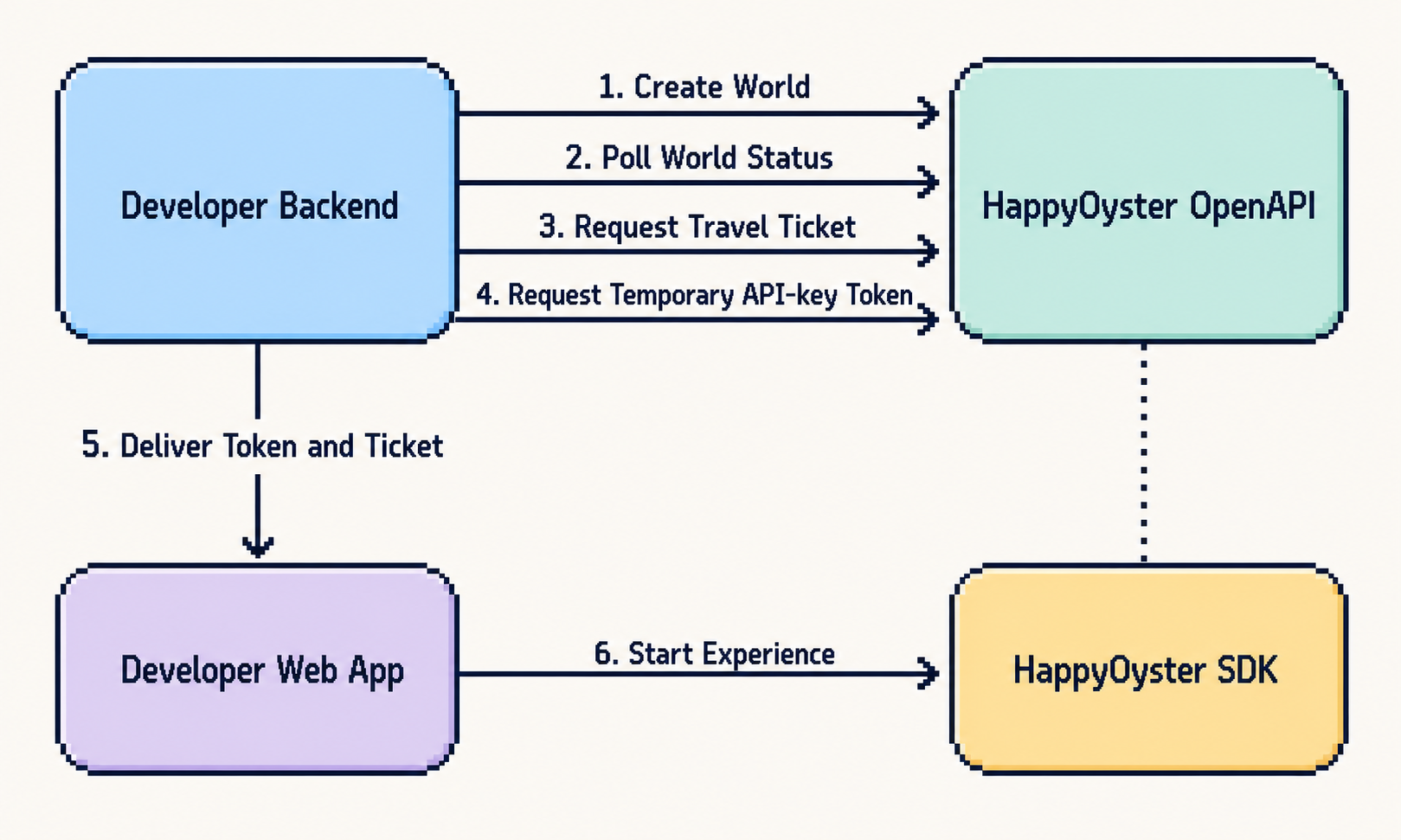
1.2 Experience Flow
Stage | Actor | Action | Description |
|---|---|---|---|
① Create a world | Application backend → HappyOyster OpenAPI |
| Returns |
② Wait until ready | Application backend → HappyOyster OpenAPI |
| Poll until |
③ Obtain a Travel credential | Application backend → HappyOyster OpenAPI |
| Returns a one-time |
④ Request a temporary API-key token | Application backend → HappyOyster OpenAPI |
| Returns a temporary API-key |
⑤ Deliver the temporary API-key token and Travel credential | Application frontend → application backend → application frontend | Request a temporary API key and Travel credential | After the frontend receives |
⑥ Enter the experience | Application frontend → HappyOyster SDK | See "SDK startup subflow" below |
|
1.3 SDK Interaction Subflow (Expanded Stage ⑥)
1.3.1 Start a Travel
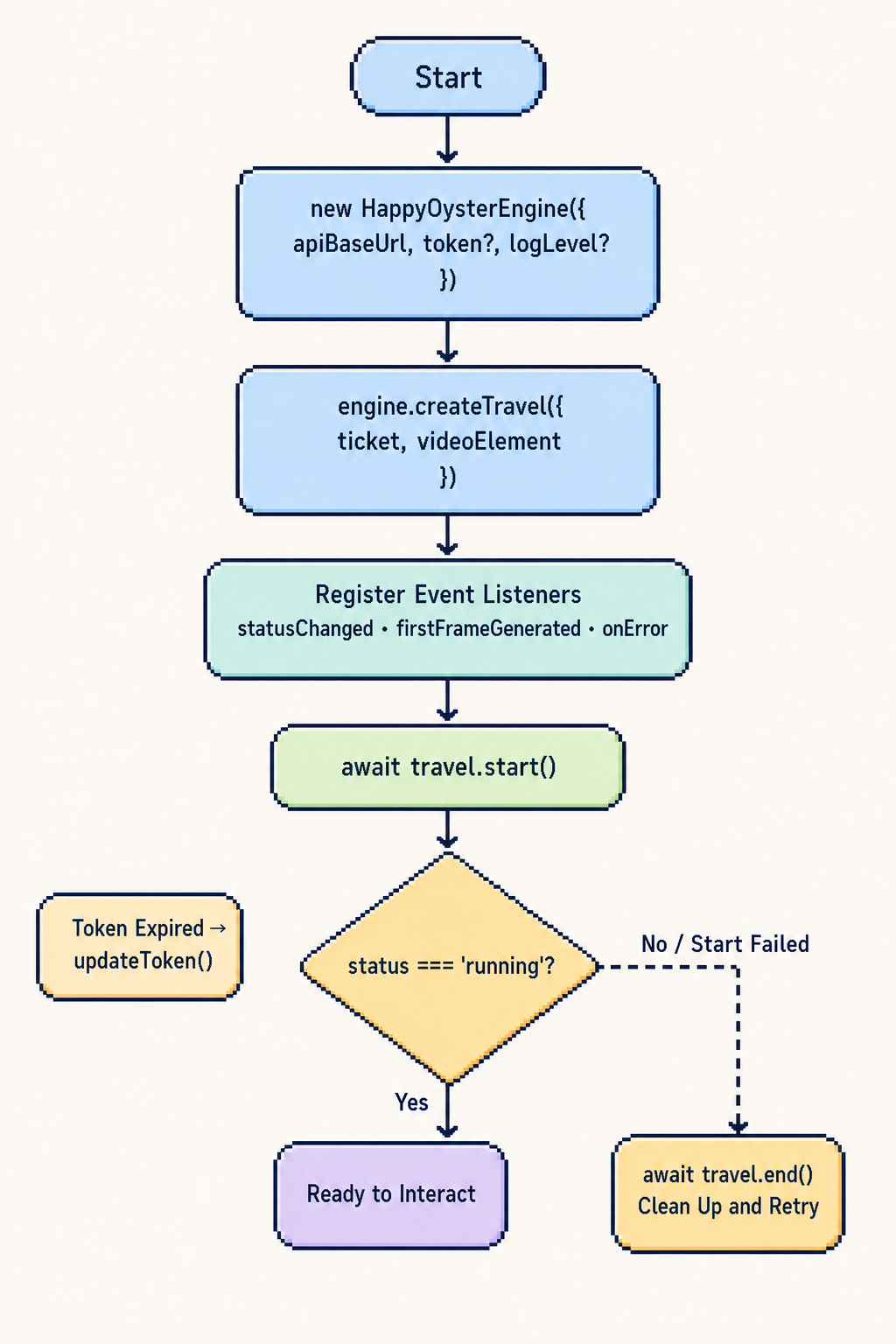
Step | API | Description |
|---|---|---|
1 |
| Reuse an Engine for the same |
2 |
| Complete this before |
3 |
|
|
4 |
| Register listeners before |
5 |
| Enters |
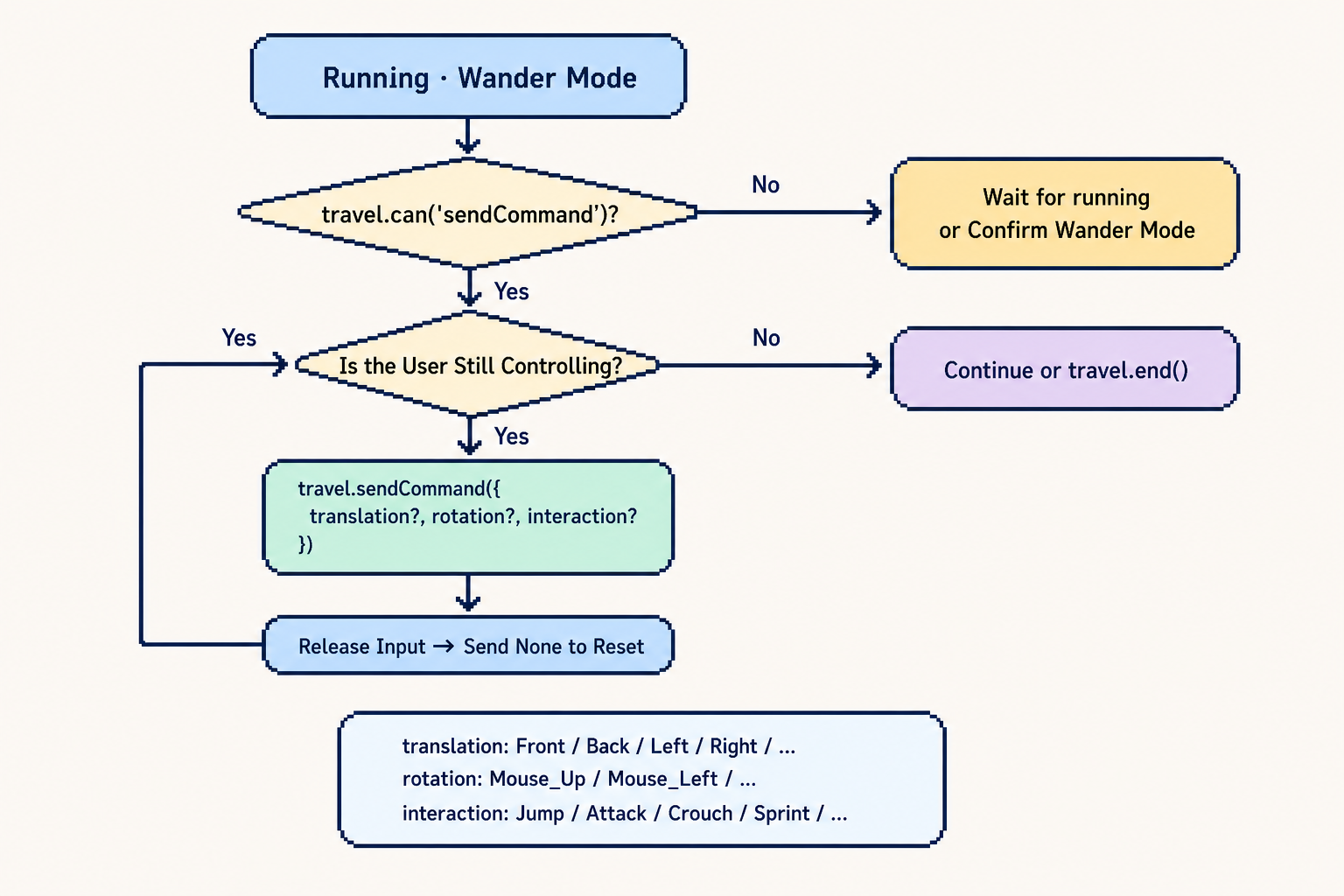
1.3.2 Play in Adventure mode
1.3.3 Play in Directing / Acting mode
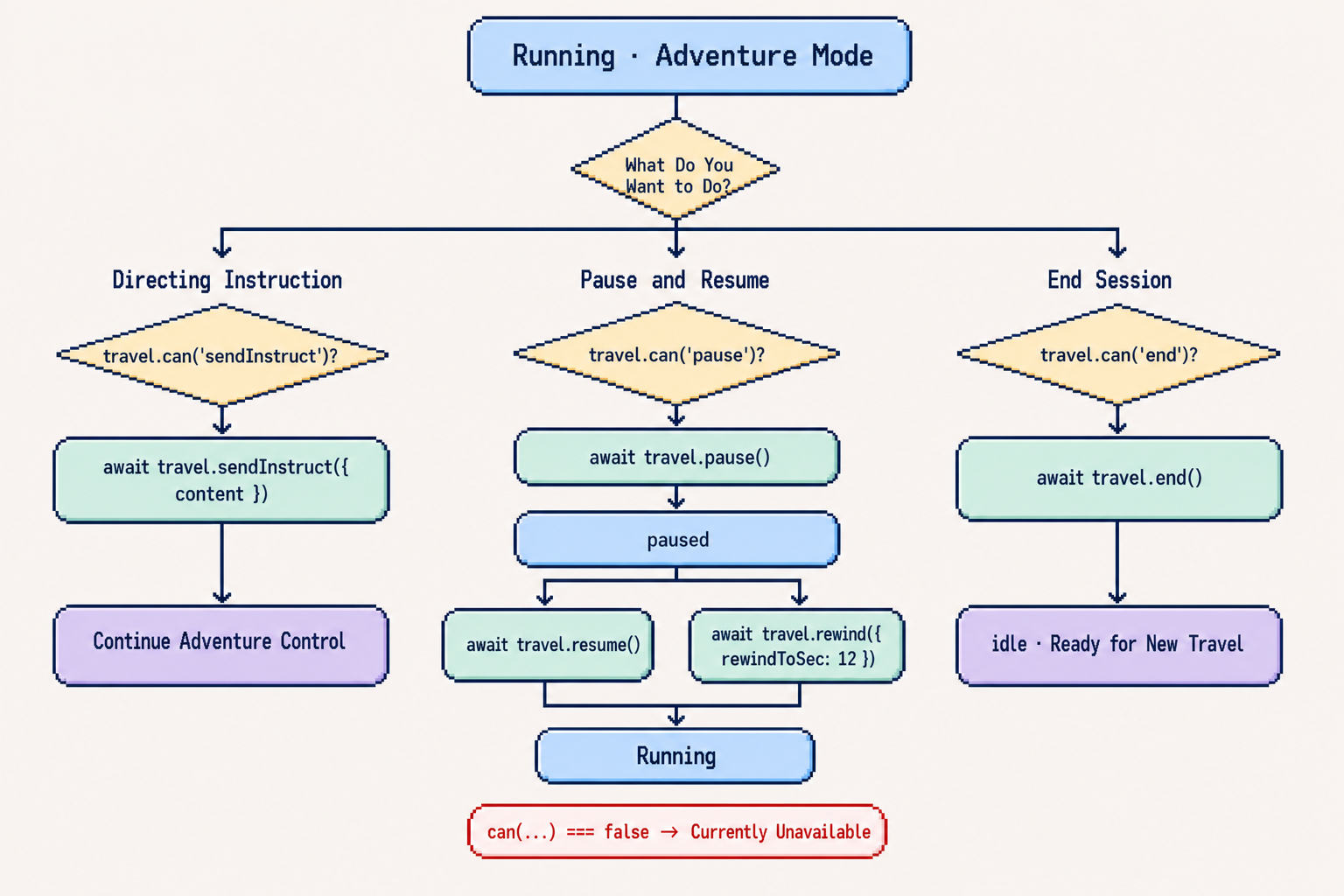
Mode | Main APIs | Typical use | Watch out for |
|---|---|---|---|
Adventure ( |
| Keyboard, joystick, and button-based real-time control | Send only after |
Directing ( |
| Natural-language Directing and playback control | Pause, resume, and rewind depend on session capability; check |
Acting ( |
| Performance-oriented experiences and aspect-ratio configuration | Pause and resume depend on session capability; |
1.4 Application Backend Practices (Summary)
On the backend side, keep the following rules simple and strict:
- Keep the primary API Key on the application backend only. The browser should receive only a short-lived
token(Demo:POST /server-api/temp-api-key). - Request Travel credentials through the backend. Authorize the world and user before issuing
ticket; do not hard-code or cache it long-term in the frontend. - Do not issue a credential until the world is
ready. Otherwise, enter-travel may fail or provide an incomplete experience. - Point the application backend and the SDK to the same Open Platform environment. The backend may use a full OpenAPI URL; the SDK's
APIHostmust be only the bare host, such asopen-platform.example.com.
2. Core SDK Concepts
In the flow described in §1, the SDK is responsible only for "enter Travel → play → control → end." There are two core objects:
Object | Purpose |
|---|---|
| Configures |
| Represents one session: |
statusChanged):
- Each Engine may have only one active Travel at a time.
videoElementmust be provided tocreateTravel.- The QwenCloud temporary API-key token and Travel ticket serve different purposes (see stages ④–⑤ in §1.2 and §3.2).
3. Initialization and Token Management
3.1 Engine Instantiation
Required
- Configure
APIHostas the Open Platform bare host, withouthttps://, a scheme, or a path, such asopen-platform.example.com. - Reuse a
HappyOysterEnginefor the sameAPIHost + model. Before switching the host or model, end the active Travel and use an Engine configured for the new target.
- Use
logLevel: 'debug'in development and'warn'or'none'in production. - Create the Engine in the session orchestration layer instead of constructing a new one for every start.
Field | Required | Guidance |
|---|---|---|
| Yes | Pass only the bare host, such as |
| Yes | Required, with no default; keep it aligned with the backend model used to create the world and issue its ticket. It is fixed for the Engine and is not inferred from |
| No | You can pass it in the constructor or set it later with |
| No | Use |
| No | Increase it if network or rendering setup is slow; provide a retry path after timeout |
- Repeatedly calling
new HappyOysterEngine()during rendering or on a hot path. - Passing a full URL, such as one with
https://, or calling SDK backend APIs after omittingAPIHost.
3.2 Dual-Credential Model
Corresponding to stages ③–⑤ in §1.2:
Credential | Source | How to set it | Purpose |
|---|---|---|---|
QwenCloud temporary API-key token | Short-lived key issued by the application backend |
| Authenticates SDK requests to Open Platform |
Travel ticket | Travel credential requested by the application backend |
| One-time credential for a Travel session |
- Prepare both credentials before
travel.start(). - The SDK does not persist or automatically refresh the token.
- If the token expires or a heartbeat error is received through
onError, request a new token through the application backend and callupdateToken.
- Mixing the two credentials.
- Exposing the primary API Key to the application frontend.
4. Travel Lifecycle
4.1 Create and Start
Required
- Call
createTravel({ ticket, videoElement });ticketis the one-time Travel credential, andvideoElementis provided at this point. - Register
statusChangedandonErrorbeforeawait travel.start()so that errors and state changes are always observed.
- Show a connecting UI during
prepareto prevent duplicate clicks. UsetravelInfoReadyto read session metadata early, and usefirstFrameGeneratedas a first-frame placeholder when available.
- Creating a Travel before the DOM element is ready.
4.2 While Running
- Drive the UI from
statusChanged:preparemeans waiting for video, whilerunningmeans interaction is available. - Observe the use cases and preconditions for
pause,resume, andrewind(they depend on session capability;rewindalso requires the session to bepausedand the stream to have stopped).
4.3 End and Recreate
Required
- End the session with
await travel.end(). - Ensure the previous Travel has ended before creating a new one.
- Call
travel.end()during cleanup when the page unloads or the route changes.
- After a failure, use "end → remove listeners → retry from stage ③ or ⑤ in §1.2."
- Request a new Travel credential when retrying if the credential is one-time use.
- Calling
createTravela second time without ending the first Travel; this throws synchronously. - Leaving the page without cleanup, which leaks RTC resources.
5. Video Element and Browser Policies
Required
- Set
playsInlineon<video>(required on iOS). - Understand how browser autoplay policies affect
autoPlayandmuted.
- During
prepare, show the first-frame image with an overlay; hide it after the session entersrunning. - Configure
streamReadyTimeoutas needed (default: 15,000 ms), and provide a retry action after a timeout. - Reserve a fixed aspect ratio for the player container.
- Passing a video element reference before the element is attached to the DOM.
- Leaving the UI interactive while the session is
pausedor the stream is disconnected.
6. Event Subscriptions and Error Handling
6.1 Event Subscriptions
Required
- Events belong to
Travel, notHappyOysterEngine. - Save the unsubscribe functions returned by
travel.on(...)andtravel.onError(...).
- Register and clean up listeners in one place. Remove old listeners before switching Travel sessions.
Event | Purpose |
|---|---|
| Display status, detect video readiness ( |
| Read |
| When a non-empty first frame exists, it follows |
| Logging, toast notifications, and triggering token refresh |
6.2 Error Layers
- Startup failures:
travel.start()rejects (enter-travel / RTC / timeout). - Runtime errors: reported through
travel.onError(RTC errors, heartbeat authentication failures, and so on). - Application backend and Open Platform errors in stages ①–④ of §1.2 are handled by the application layer and do not enter the SDK.
- Catching only
start()without listening toonError. - Registering listeners repeatedly without unsubscribing.
7. Sending Instructions: Command and Instruct
7.1 sendCommand (Real-Time Control)
sendCommand() provides real-time control in Adventure mode (1). It sends commands through the RTC DataChannel and is available only while the session is running.
The SDK sends at most one command approximately every 42 ms (about 24 FPS). If one cycle has elapsed since the previous send, it sends the new command immediately. If sendCommand() is called multiple times within the same cycle, it sends only the complete command from the last call. translation, rotation, and interaction are independent control dimensions. Omitted fields are sent as None; the SDK does not merge fields across calls, periodically repeat the previous command, or automatically send None.
One-off actions
Call sendCommand() once for one-off actions such as jumping or attacking:
sendCommand() while a movement or continuous view rotation control remains pressed. The frontend application does not need to throttle calls to 42 ms; the SDK coalesces high-frequency calls into an output rate of about 24 FPS. On release, explicitly send None to reset the control:
- Sending many commands during
prepare. - Using
sendCommandfor natural-language Directing instructions.
7.2 sendInstruct (Directing Instructions)
Required
- a Directing session (
2) or an Acting session (3) that is notscriptlist; callawait travel.sendInstruct({ content }).
- Verify that
contentis not empty before sending and prevent duplicate submissions. - Provide user feedback based on returned fields such as
accepted.
8. Troubleshooting
Symptom | Common cause | What to do |
|---|---|---|
SDK initialization fails with an argument error |
| Pass only the bare host, such as |
|
| Request a new |
| The QwenCloud temporary API-key | Ask your backend for a new token, then call |
The player keeps loading or | Remote stream is not ready, network is slow, or | Provide a retry action; increase |
A second | The previous Travel was not ended | Call |
Controls or instructions do nothing | The session is not | Drive button availability from |
ErrorCode, current TravelStatus, and backend request logs. That usually tells you whether the issue is credential-related, state-related, network-related, or rendering-related.