

HappyOyster is a real-time interactive open-world model. From a single natural-language prompt and a first-frame image, it generates a digital world you can perform, explore, and interact with in real time, delivered as a joinable live video stream. Well-suited to interactive drama, film previsualization, AI companions, and playable worlds.
Introduction
HappyOyster offers three experience modes, each deployed independently to cover different scenarios:
| Mode | Input | Interaction |
|---|---|---|
| Adventure | Prompt + first-frame image (landscape) | Directional / camera / action commands (sendCommand) |
| Directing | Prompt or structured script + first-frame image (landscape), optional reference images (used for script generation and character reference) | Text instructions (sendInstruct) / script list; supports pause, rewind, resume |
| Acting | Prompt + first-frame image (portrait 9:16 by default, 16:9 also supported) | Text instructions (sendInstruct); supports pause and resume; does not support rewind |
Architecture
HappyOyster uses a server + client integration model:
- Your server manages the full World lifecycle through the HappyOyster Open APIs (with the primary API Key, over standard HTTPS REST): create / manage worlds, exchange credentials, and query history and artifacts. The Open APIs are split by experience mode into three separate suites: Adventure, Directing, and Acting.
- Your client delivers the real-time experience through the HappyOyster SDK (with a temporary API Key +
ticket, over an RTC real-time audio / video channel), supporting Android, iOS, and Web. The SDK encapsulates the RTC connection, video playback, status polling, and interactive commands, so you do not have to work with the underlying real-time protocol directly.
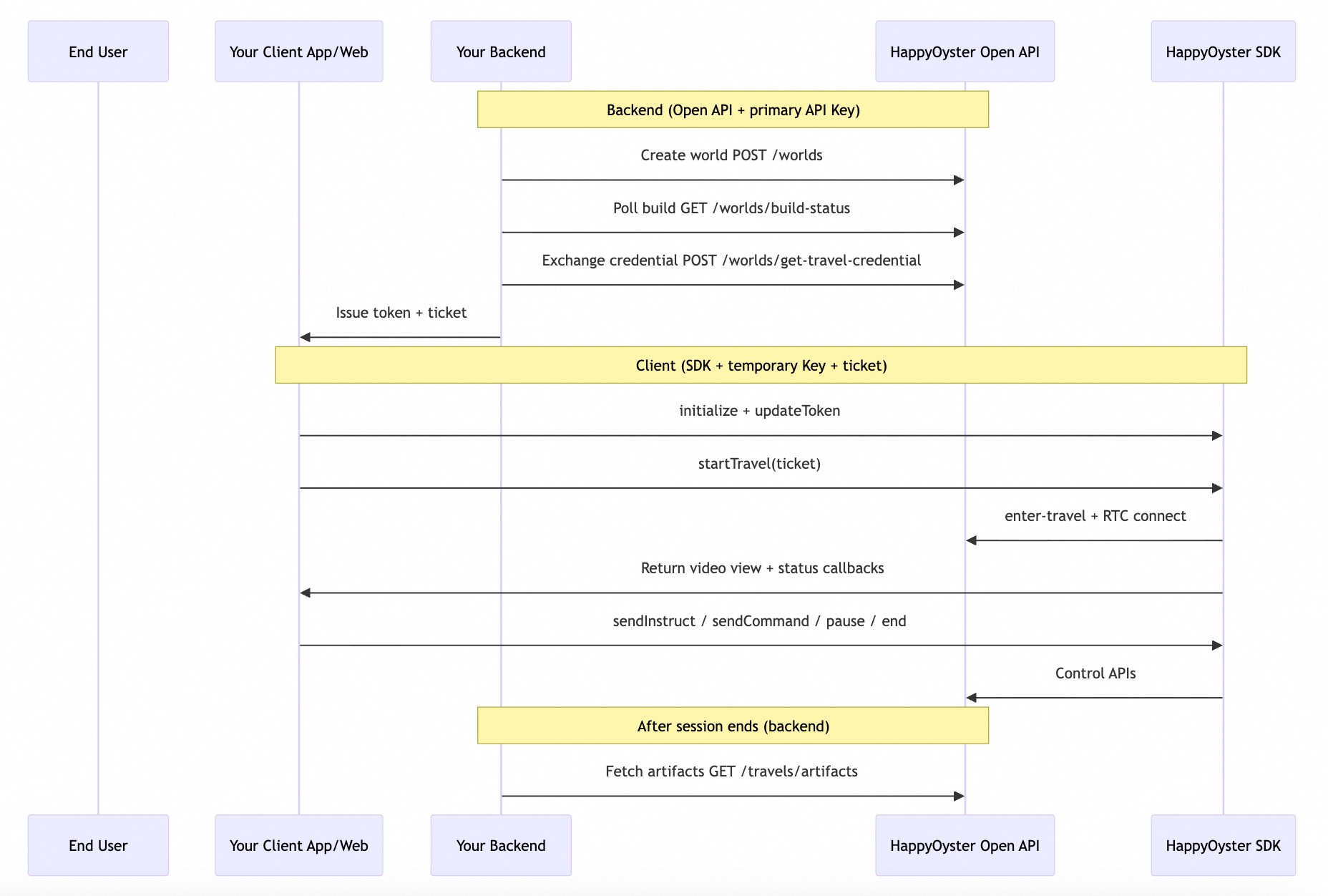
Open API and SDK
Responsibilities
| Dimension | Server-side HappyOyster Open API | Client-side HappyOyster SDK |
|---|---|---|
| Caller | Your backend | Your app or web frontend |
| Credentials | Primary API Key (long-term, held only on the server) | Temporary API Key (token) + one-time ticket (short-lived) |
| Core responsibilities | World management (create, status polling, query, delete); credential exchange; Travel control; artifact query | RTC connection and video rendering; real-time interaction commands; session control; status callbacks |
| Communication | Standard HTTPS REST | RTC real-time audio / video channel (encapsulated inside the SDK) |
| Supported platforms | Any backend language (Python, Java, Node.js, etc.) | Android, iOS, Web |
Capability Map
| Capability | Open API (server) | SDK (client) |
|---|---|---|
| Create / manage World | Supported | Not supported |
| Poll world build status | Supported | Not supported |
Exchange ticket | Supported | Not supported (consumes ticket) |
| Inject HTTP auth token | Not supported | Supported (updateToken) |
| Enter room + RTC connection | Supported (invoked internally by the SDK) | Supported (Travel start, encapsulated inside the SDK) |
| Real-time video playback | Not supported | Supported (attach the SDK-provided video view; for Acting, use the returned aspectRatio to set portrait / landscape orientation) |
| Status polling | Supported (invoked internally by the SDK) | Supported (surfaced via status callbacks) |
| Directing / Acting text instructions | Supported (instruct) | Supported (sendInstruct) |
| Adventure control commands | Not supported | Supported (sendCommand; not available in Acting) |
| Pause / resume | Supported | Supported (Directing and Acting; Adventure calls are rejected by the SDK with 103003) |
| Rewind | Supported (rewind; Directing only) | Supported (Directing only; other modes are rejected with 103003) |
| End the experience | Supported | Supported (Travel end, encapsulated inside the SDK) |
| Update script (ScriptList) | Supported (update-script; Directing scriptlist only. Acting and Directing simple calls return 409000) | Not supported |
| Query Travel history | Supported | Not supported |
| Retrieve video artifacts | Supported | Not supported |
The SDK is not responsible for creating or managing worlds. The Directing script (Script List) mode is available only on the server side; the SDK only handles streaming, playback, and text instruction input.
Scenarios
| Scenario | Recommended Mode | Key server API | Key client SDK capability |
|---|---|---|---|
| Interactive games / playable worlds | Adventure | Create world → credential exchange | sendCommand + status callbacks |
| AI companion / virtual guide | Adventure | Create with first-frame image + prompt | Real-time experience + video view |
| Interactive short drama / film previsualization | Directing | simple prompt or scriptlist structured script | sendInstruct + pause / rewind |
| Video-call / portrait companion | Acting | Required prompt + firstFrameImage, optional aspectRatio | sendInstruct + pause / resume (no rewind) |
| Content platform / derivative creation | Directing | artifacts export after the session ends | Experience + server-side artifact retrieval |
| Educational simulation | Adventure | Build the scene with a first-frame image + prompt | Fast room entry experience |
Limitations
- Aspect ratio rules:
- Adventure:
firstFrameImageis required; the video aspect ratio follows the first-frame image. - Directing:
firstFrameImageis optional insimplesub-mode and required inscriptlistsub-mode. When supplied, it must be landscape (width / height 1.5–2.0) and the aspect ratio follows the first-frame image; anyaspectRatiovalue passed at creation time is ignored. - Acting:
firstFrameImageis required; the aspect ratio is controlled byaspectRatioat creation time, defaulting to9:16(portrait), and16:9may be passed explicitly. This field is echoed on room entry and in world details, and the client should set the player orientation accordingly. The first-frame aspect ratio must match the target aspect ratio, otherwise400000is returned.
- Adventure:
- Cross-model access: A World and a Travel are strictly bound to the model that created them; cross-model access returns
403001(world) or404000(travel). - Mode differences: Acting does not support rewind (
rewind) orsendCommand; calling pause / resume in Adventure returns103003. - Region availability: Adventure (
happyoyster-1.0-adventure) is available in Singapore, China North 2 (Beijing), and US (Virginia). Directing and Acting are available in Singapore and US (Virginia). Use the endpoint of a region where the mode is available.
Glossary
- World: A complete definition of a digital world, including characters, scenes, and scripts. A World can be pre-built and reused; it is the foundation of every experience.
- Travel: A real-time experience session initiated from a World. It generally goes through the stages "initialize → prepare → running → (optionally pause / rewind) → end"; the exact status values are per-SDK — see the corresponding SDK API reference.
- ticket: A one-time room entry credential issued by the server and delivered to the client.
- token (temporary API Key): The HTTP-layer credential for the client SDK, signed by the server and injected into the SDK; must be periodically renewed.
Check Model Usage
The console's "Model Usage" module does not yet cover world-model usage statistics. View your usage on the Billing and cost management page instead.
Next Steps
- Quick Start: Complete the end-to-end integration.