

HappyOyster world model user guide: capabilities, showcases, and prompt-writing for the Adventure, Directing, and Acting modes.
Overview
HappyOyster is an open-world model series — give it text or an image and it generates an interactive digital world in real time, covering three modes: Adventure, Directing, and Acting. Visit the HappyOyster console to try it online:
| Mode | What it does | Input | Output |
|---|---|---|---|
| Adventure (World Exploration) | Enter a generated world in first or third person; move, fight, and ride freely | Text + first-frame image | Real-time interactive video stream, 1+ minute continuous interaction |
| Directing (Real-time Directing) | Stream a 3-minute video; inject commands at any time to change the story | Text / first-frame image / multi-image reference | Streaming video with pause, rewind, and branching |
| Acting (Character Roleplay) | Talk face-to-face with a generated character who responds with expressions, actions, and voice | Text + first-frame image | Real-time interactive video stream |
Adventure (World Exploration)
From text + first-frame image input, it generates an open-world scene of any style with multiple forms of interaction. Supports first-person and third-person views with 1+ minute of real-time movement and camera control. An image plus a line of description is all you need to enter a world you can move through, fight in, and interact with — ride horses, fly, drive, and explore worlds of different styles. Define what you want to play at creation time, and the world responds in kind.
Showcases
Perspective comparison
| Third person | First person |
|---|---|
| See your character's full body — suited for action-adventure and role-play. | Immersive POV exploration — suited for driving and stealth. |
Scene-aware interaction
The model understands what's in the frame and opens up matching gameplay based on the objects in the scene.
| Subject motion | Environmental interaction | Physical response |
|---|---|---|
| Sprint, jump, crouch, attack (varies by character type) | Enter vehicles, trigger scene mechanisms | Collision, bounce, gravity and other physics feedback |
World styles
Supports world generation in any style. Here are some examples:
| Felt · Island Game | Space · Moonwalk | Fantasy · Flight |
|---|---|---|
| Cartoon-material rendering, non-realistic exploration | Low-gravity physics, space-scene interaction | Flight, flying broomstick and other fantasy interactions |
| Animal riding | Combat & attacks | Vehicles |
|---|---|---|
| Mount, dismount, riding control | Punches, bows, firearms, magic | Cars, bicycles, skateboards |
Interactions
| Capability | Description |
|---|---|
| Subject motion | Sprint, jump, crouch, attack (varies by character type) |
| Combat | Punches, bows, firearms, magic; solo/duo fighting |
| Mounts & vehicles | Mount/dismount horses; cars, bicycles, skateboards |
| Environmental interaction | Enter vehicles, physics collision response |
| World styles | Realistic, anime, felt, space, fantasy — any style |
| Perspective | First person (immersive POV) / third person (action-adventure) |
Prompt writing
Two core principles: first, whatever is in the scene is what you get to play with; second, whatever reaction you want, write the reaction out too. Objects you don't write can't be played with, and reactions you don't write won't be performed.
Write your creation description along these 5 points and the interaction will match your expectations better:
- Perspective: First decide first-person or third-person. First-person suits immersive driving and POV exploration; third-person lets you see your character, suited for action-adventure and role-play.
- Who you play: Spell out the main character's gender / identity / appearance (e.g., "a female warrior in leather armor"). This matters especially for third-person, since how the character looks directly determines the motion style.
- Weapons / equipment: If you want to fight or attack, state what's in hand: fists / longbow / firearm / magic / sword. Different items mean different available actions.
- Opponent and reaction: Beyond stating who you hit, write out "what happens after a hit": the opponent stumbles back / drops on impact / raises a shield to block, plus the impact effects you want (sparks, spurting flames, a shockwave). The model performs the reaction you write — the more specific the reaction and effects, the stronger the sense of impact.
- Interactable objects: If you want to ride or drive, make the horse, car, bicycle, skateboard, etc. appear in the frame. If an object isn't in the frame, you can't get on it.
Prompt examples
Third person · Action-adventure
Reference example
| First frame | Prompt | Generated video |
|---|---|---|
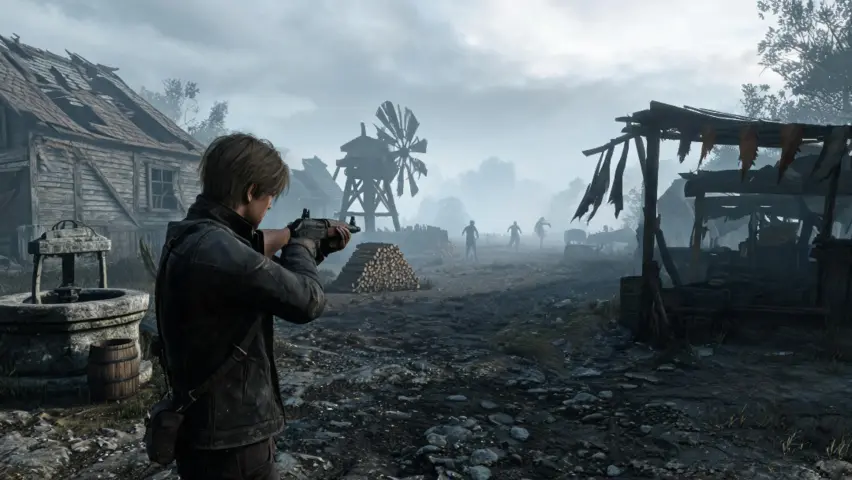 | Realistic cinematic game visuals. Third-person over-the-shoulder view, a man in a worn dark leather jacket stands on a dirt road in an abandoned village, shotgun raised in a combat stance. In the distant fog, several twisted humanoid creatures are slowly approaching. Surrounding him are collapsed wooden houses, a ruined windmill, and stacked firewood. The sky is overcast and gloomy, the overall atmosphere oppressive and terrifying, tones mainly grey-brown and dark green. |
Directing (Real-time Directing)
From text, a first-frame image, or multiple reference images, it streams a video up to 3 minutes long. Inject commands at any time during generation to change the story's direction; supports pause, rewind, and branching. Reference uploaded images to lock character/prop appearance for full consistency.
Showcases
Storytelling
| Single-character scene | Two-character scene |
|---|---|
| Single-character monologue or action scene. | Two-character dialogue, realistic cinematic texture. |
POV immersive interaction
| POV outdoor exploration | Realistic character interaction |
|---|---|
| First-person roaming through outdoor environments. | Face-to-face real-time interaction with realistic characters. |
Core capabilities
| Capability | Description |
|---|---|
| Streaming generation | Real-time generation and playback, no need to wait for full render |
| Command injection | Insert new commands at any time during generation to change character actions, camera work, or scene environment |
| Pause & rewind | Pause then continue, or rewind to any point and re-perform |
| Multimodal reference | Reference uploaded images to lock character/prop appearance for 3-minute consistency |
Command injection types
| Type | Example | Notes |
|---|---|---|
| Action trigger | "She suddenly stands up." / "He puts the cup down." | Short + clear action, most reliable |
| Camera work | "Cut to a facial close-up." / "Slowly pull the camera back." | Cinematic terms are more precise |
| Scene change | "It starts to rain." / "Time jumps to dusk." | Inject an environment variable to shift mood |
| New character | "The door is pushed open, a man in a black hat walks in." | Spell out appearance + first action |
Prompt writing
A 3-minute video needs a structured screenplay. A six-part prompt structure is recommended:
| Part | Name | Purpose |
|---|---|---|
| 1 | World | Time-space + genre + core conflict, 1-2 sentences to set the narrative coordinate |
| 2 | Character | Gender/age/appearance/clothing/personality/emotion/voice — 7 essentials + reference images to lock appearance |
| 3 | Style | Director / color grade / lighting — three anchors |
| 4 | Scene | Scene type / ambient mood / layout / ambient sound — four dimensions |
| 5 | Full script | Settings lock (viewpoint/subject/voice/pace LOCK) + shot plan (Open/Build/Turn/Sustain/Close — 5 acts) |
| 6 | Negative list | Image/sound elements that must not appear |
Section-by-section
Acting (Character Roleplay)
From text + first-frame image input, it generates a face-to-face virtual character. When you speak, the character responds in real time with expressions, actions, and voice, while appearance, voice, and personality stay consistent for 3 minutes. Upload an image to bring the character in your mind to life and start a real-time conversation.
Showcases
Acting's core interaction is "you and the character, face to face" — you speak, and the character responds in real time with expressions, actions, and lines. Throughout the session, the character is always the same person.
| Realistic · Face-to-face | 2D stylized |
|---|---|
| Realistic character; expressions and tone shift naturally with the conversation; appearance locked throughout. | 2D stylized anime/illustration-style character — also supports face-to-face real-time dialogue with natural expression and tone changes. |
Core interaction
| Capability | Effect |
|---|---|
| Real-time dialogue | You say a line, the character instantly responds with expressions, actions, and lines — like a real conversation |
| Face-to-face POV | The frame always faces the character's face; only your hand/forearm enters frame, keeping attention on the character |
| Appearance lock | Upload an image to lock the character's look and key props; no face or voice changes throughout |
| Emotional continuity | The character's expressions and tone shift naturally as the conversation progresses — not a fixed template |
Core capabilities
| Capability | Description |
|---|---|
| Real-time dialogue | You say a line, the character responds instantly with expressions, actions, and lines |
| Face-to-face POV | Default first-person view; the camera always faces the character's face; the user never appears on screen |
| Long-range consistency | The character's appearance, clothing, voice, and personality stay unchanged for 3 minutes; upload an image to precisely lock appearance |
Prompt writing
Acting prompts focus on the character itself and your relationship with the character. Structure along these 5 dimensions:
| Dimension | Description | Example |
|---|---|---|
| Persona | Gender/age/appearance/clothing/identity/personality | "A young woman in her early twenties, long straight black hair, wearing a cream knit sweater, gentle and smiley" |
| Voice | Gendered voice + age range + accent + temperament | "Young female voice, bright, with a slightly coy nasal tone" |
| Relationship & setting | Your relationship with the character + current scene | "Lovers, a café by the window at dusk, warm yellow light" |
| Viewpoint lock | POV + "my" hand features | "Throughout, only she and my right hand enter frame (adult male, well-defined knuckles)" |
| Opening | The character's first action and first line | "She rests her chin on her hand, looks at me, and says with a smile: 'You're here so early today'" |