

Connect to the Qwen-TTS-Realtime real-time speech synthesis service over WebSocket. Covers the service endpoint, request headers, and interaction flow.
For model overview and selection guidance, see Real-time speech synthesis
The Qwen-TTS Realtime API uses the WebSocket protocol. Java and Python applications can use the DashScope SDK to skip WebSocket handling. Other languages can connect with a WebSocket library directly.
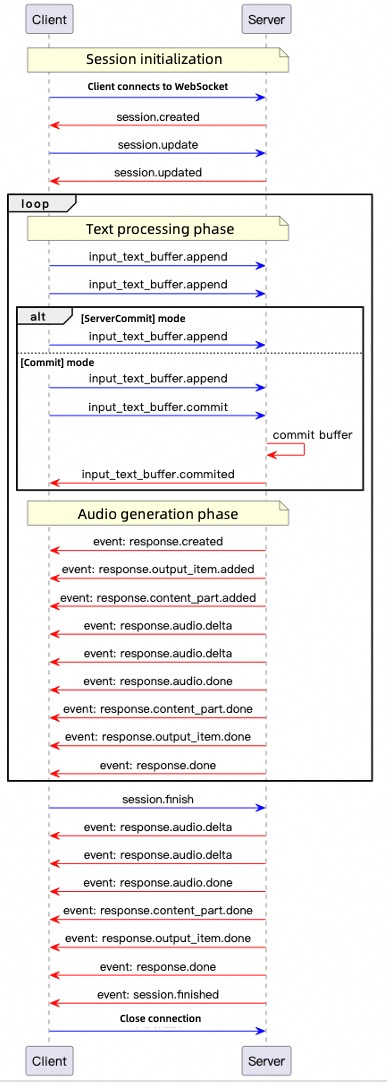 Key steps:
Service endpoint
Use the following URL. Set the model with themodel query parameter:
WebSocket URL (Singapore): wss://ap-southeast-1.maas.qwencloudapi.com/api-ws/v1/realtime?model=qwen3-tts-flash-realtime
For another region, replace ap-southeast-1 in the URL with that region's code. API keys are region-specific. See Regions.
The URL must use the
wss:// protocol. Set the Authorization header (see Request headers) and specify the model using the model query parameter.Request headers
Set the following request headers:| Parameter | Type | Required | Description |
|---|---|---|---|
| Authorization | string | Yes | Format: Bearer $DASHSCOPE_API_KEY. Replace $DASHSCOPE_API_KEY with your API key. |
| user-agent | string | No | Client identifier for server-side source tracking. |
| X-DashScope-WorkSpace | string | No | The QwenCloud workspace ID. |
Authorization is verified during the WebSocket handshake. An invalid or missing API key causes the handshake to fail with HTTP 401/403.
Interaction flow
For detailed descriptions of client events and server events, see Client events and Server events. The API supports two modes:- ServerCommit mode: The server determines text segmentation and synthesis timing automatically.
- Commit mode: The client controls when to submit each text segment. Call
input_text_buffer.commitexplicitly to trigger synthesis.
Mode details
- In ServerCommit mode, call
input_text_buffer.appendto buffer text. The system determines synthesis timing automatically. - Calling
input_text_buffer.commitin ServerCommit mode synthesizes the current buffer immediately. The session then resumes ServerCommit mode. - In Commit mode,
input_text_buffer.appendalone does not trigger synthesis. Callinput_text_buffer.committo start synthesis.
-
Connection: The client opens a WebSocket connection. The server returns
session.createdwhen ready. -
Session configuration: The client sends
session.updateto configure voice, format, and mode. -
Text input: The client sends
input_text_buffer.appendto add text to the buffer. -
Synthesis trigger:
- In ServerCommit mode, synthesis starts automatically. The client can call
input_text_buffer.committo force immediate synthesis. - In Commit mode, only
input_text_buffer.committriggers synthesis.
- In ServerCommit mode, synthesis starts automatically. The client can call
-
Audio generation: The server sends
response.created, then streams base64-encoded audio asresponse.audio.deltaevents untilresponse.audio.done. -
Session termination: The client sends
session.finishto release resources. The server returnssession.finishedand closes the connection.
session.created event:
Copy
{
    "event_id": "event_xxx",
    "type": "session.created",
    "session": {
        "object": "realtime.session",
        "mode": "server_commit",
        "model": "qwen3-tts-flash-realtime",
        "voice": "Cherry",
        "response_format": "pcm",
        "sample_rate": 24000,
        "id": "sess_xxx"
    }
}
Code examples
The examples provide Python and Java clients and both commit modes. SetDASHSCOPE_API_KEY for the region used by the example endpoint. Python requires websockets and pyaudio; Java requires Java-WebSocket and Gson and uses Java Sound for playback. Each client event uses a unique UUID.
Java
Copy
<dependencies>
    <dependency>
        <groupId>org.java-websocket</groupId>
        <artifactId>Java-WebSocket</artifactId>
        <version>1.5.3</version>
    </dependency>
    <dependency>
        <groupId>com.google.code.gson</groupId>
        <artifactId>gson</artifactId>
        <version>2.10.1</version>
    </dependency>
</dependencies>
- Create the client
- Java
- Python
Create a Java file named
TTSRealtimeClient.java and copy the following code into the file:Copy
import com.google.gson.Gson;
import com.google.gson.JsonObject;
import org.java_websocket.client.WebSocketClient;
import org.java_websocket.handshake.ServerHandshake;

import java.net.URI;
import java.util.Base64;
import java.util.HashMap;
import java.util.Map;
import java.util.concurrent.CountDownLatch;
import java.util.function.Consumer;

/**
 * A client for interacting with the TTS Realtime API.
 *
 * This class provides methods for connecting to the TTS Realtime API, sending text data, retrieving audio output, and managing WebSocket connections.
 */
public class TTSRealtimeClient {

    public enum SessionMode {
        SERVER_COMMIT("server_commit"),
        COMMIT("commit");
        private final String value;
        SessionMode(String value) { this.value = value; }
        public String getValue() { return value; }
    }

    /**
     * Audio callback interface
     */
    public interface AudioCallback {
        void onAudio(byte[] audioData);
    }

    private final String baseUrl;
    private final String apiKey;
    private final String voice;
    private final SessionMode mode;
    private final String languageType;
    private final AudioCallback audioCallback;
    private final Gson gson = new Gson();

    private WebSocketClient ws;
    private CountDownLatch responseDoneLatch;
    private CountDownLatch sessionFinishedLatch;

    public TTSRealtimeClient(String baseUrl, String apiKey, String voice,
                             SessionMode mode, AudioCallback audioCallback,
                             String languageType) {
        this.baseUrl = baseUrl;
        this.apiKey = apiKey;
        this.voice = voice;
        this.mode = mode;
        this.audioCallback = audioCallback;
        this.languageType = languageType;
    }

    public TTSRealtimeClient(String baseUrl, String apiKey, String voice,
                             SessionMode mode, AudioCallback audioCallback) {
        this(baseUrl, apiKey, voice, mode, audioCallback, "Auto");
    }

    /**
     * Establish a WebSocket connection to the TTS Realtime API.
     */
    public void connect() throws Exception {
        Map<String, String> headers = new HashMap<>();
        headers.put("Authorization", "Bearer " + apiKey);

        responseDoneLatch = new CountDownLatch(0);
        sessionFinishedLatch = new CountDownLatch(1);

        ws = new WebSocketClient(new URI(baseUrl), headers) {
            @Override
            public void onOpen(ServerHandshake handshake) {
                System.out.println("WebSocket connection established");
                // Send default session configuration
                JsonObject session = new JsonObject();
                session.addProperty("mode", mode.getValue());
                session.addProperty("voice", TTSRealtimeClient.this.voice);
                session.addProperty("language_type", languageType);
                session.addProperty("response_format", "pcm");
                session.addProperty("sample_rate", 24000);
                updateSession(session);
            }

            @Override
            public void onMessage(String message) {
                JsonObject event = gson.fromJson(message, JsonObject.class);
                String eventType = event.has("type") ? event.get("type").getAsString() : "";

                if (!"response.audio.delta".equals(eventType)) {
                    System.out.println("Received event: " + eventType);
                }

                switch (eventType) {
                    case "error":
                        System.err.println("Error: " + event.get("error"));
                        break;
                    case "session.created":
                        System.out.println("Session created, ID: " +
                            event.getAsJsonObject("session").get("id").getAsString());
                        break;
                    case "session.updated":
                        System.out.println("Session updated, ID: " +
                            event.getAsJsonObject("session").get("id").getAsString());
                        break;
                    case "input_text_buffer.committed":
                        System.out.println("Text buffer committed, item ID: " + event.get("item_id"));
                        break;
                    case "input_text_buffer.cleared":
                        System.out.println("Text buffer cleared");
                        break;
                    case "response.created":
                        System.out.println("Response created, ID: " +
                            event.getAsJsonObject("response").get("id").getAsString());
                        responseDoneLatch = new CountDownLatch(1);
                        break;
                    case "response.output_item.added":
                        System.out.println("Output item added, ID: " +
                            event.getAsJsonObject("item").get("id").getAsString());
                        break;
                    case "response.audio.delta":
                        if (audioCallback != null) {
                            byte[] audioBytes = Base64.getDecoder().decode(
                                event.get("delta").getAsString());
                            audioCallback.onAudio(audioBytes);
                        }
                        break;
                    case "response.audio.done":
                        System.out.println("Audio generation completed");
                        break;
                    case "response.done":
                        System.out.println("Response completed");
                        responseDoneLatch.countDown();
                        break;
                    case "session.finished":
                        System.out.println("Session finished");
                        sessionFinishedLatch.countDown();
                        break;
                }
            }

            @Override
            public void onClose(int code, String reason, boolean remote) {
                System.out.println("Connection closed: " + reason);
            }

            @Override
            public void onError(Exception ex) {
                System.err.println("WebSocket error: " + ex.getMessage());
            }
        };
        ws.connectBlocking();
    }

    /**
     * Send an event to the server.
     */
    public void sendEvent(JsonObject event) {
        String eventId = "event_" + java.util.UUID.randomUUID().toString();
        event.addProperty("event_id", eventId);
        System.out.println("Sending event: type=" + event.get("type").getAsString()
            + ", event_id=" + eventId);
        ws.send(gson.toJson(event));
    }

    /**
     * Update the session configuration.
     */
    public void updateSession(JsonObject config) {
        JsonObject event = new JsonObject();
        event.addProperty("type", "session.update");
        event.add("session", config);
        System.out.println("Updating session configuration: " + event);
        sendEvent(event);
    }

    /**
     * Send text data to the API.
     */
    public void appendText(String text) {
        JsonObject event = new JsonObject();
        event.addProperty("type", "input_text_buffer.append");
        event.addProperty("text", text);
        sendEvent(event);
    }

    /**
     * Commit the text buffer to trigger processing.
     */
    public void commitTextBuffer() {
        JsonObject event = new JsonObject();
        event.addProperty("type", "input_text_buffer.commit");
        sendEvent(event);
    }

    /**
     * Clear the text buffer.
     */
    public void clearTextBuffer() {
        JsonObject event = new JsonObject();
        event.addProperty("type", "input_text_buffer.clear");
        sendEvent(event);
    }

    /**
     * End the session.
     */
    public void finishSession() {
        JsonObject event = new JsonObject();
        event.addProperty("type", "session.finish");
        sendEvent(event);
    }

    /**
     * Wait for the response.done event.
     */
    public void waitForResponseDone() throws InterruptedException {
        responseDoneLatch.await();
    }

    /**
     * Wait for the session.finished event.
     */
    public void waitForSessionFinished() throws InterruptedException {
        sessionFinishedLatch.await();
    }

    /**
     * Close the WebSocket connection.
     */
    public void close() {
        if (ws != null) {
            ws.close();
        }
    }
}
Create a Python file named
tts_realtime_client.py and copy the following code into the file:Copy
# -- coding: utf-8 --

import asyncio
import websockets
import json
import base64
import time
import uuid
from typing import Optional, Callable, Dict, Any
from enum import Enum

class SessionMode(Enum):
    SERVER_COMMIT = "server_commit"
    COMMIT = "commit"

class TTSRealtimeClient:
    """
    Client for interacting with the TTS Realtime API.

    This class provides methods for connecting to the TTS Realtime API, sending text data,
    receiving audio output, and managing WebSocket connections.

    Attributes:
        base_url (str):
            Base URL of the Realtime API.
        api_key (str):
            API Key for authentication.
        voice (str):
            Voice used for server-side speech synthesis.
        mode (SessionMode):
            Session mode, either server_commit or commit.
        audio_callback (Callable[[bytes], None]):
            Callback function for receiving audio data.
        language_type(str)
            Language for synthesized speech. Options: Chinese, English, German, Italian, Portuguese, Spanish, Japanese, Korean, French, Russian, Auto
    """

    def __init__(
            self,
            base_url: str,
            api_key: str,
            voice: str = "Cherry",
            mode: SessionMode = SessionMode.SERVER_COMMIT,
            audio_callback: Optional[Callable[[bytes], None]] = None,
        language_type: str = "Auto"):
        self.base_url = base_url
        self.api_key = api_key
        self.voice = voice
        self.mode = mode
        self.ws = None
        self.audio_callback = audio_callback
        self.language_type = language_type

        # Current response state
        self._current_response_id = None
        self._current_item_id = None
        self._is_responding = False
        self._response_done_future = None

    async def connect(self) -> None:
        """Establish WebSocket connection with the TTS Realtime API."""
        headers = {
            "Authorization": f"Bearer {self.api_key}"
        }

        self.ws = await websockets.connect(self.base_url, additional_headers=headers)

        # Set default session configuration
        await self.update_session({
            "mode": self.mode.value,
            "voice": self.voice,
            "language_type": self.language_type,
            "response_format": "pcm",
            "sample_rate": 24000
        })

    async def send_event(self, event) -> None:
        """Send an event to the server."""
        event['event_id'] = "event_" + uuid.uuid4().hex
        print(f"Sending event: type={event['type']}, event_id={event['event_id']}")
        await self.ws.send(json.dumps(event))

    async def update_session(self, config: Dict[str, Any]) -> None:
        """Update session configuration."""
        event = {
            "type": "session.update",
            "session": config
        }
        print("Updating session configuration: ", event)
        await self.send_event(event)

    async def append_text(self, text: str) -> None:
        """Send text data to the API."""
        event = {
            "type": "input_text_buffer.append",
            "text": text
        }
        await self.send_event(event)

    async def commit_text_buffer(self) -> None:
        """Commit text buffer to trigger processing."""
        event = {
            "type": "input_text_buffer.commit"
        }
        await self.send_event(event)

    async def clear_text_buffer(self) -> None:
        """Clear the text buffer."""
        event = {
            "type": "input_text_buffer.clear"
        }
        await self.send_event(event)

    async def finish_session(self) -> None:
        """End the session."""
        event = {
            "type": "session.finish"
        }
        await self.send_event(event)

    async def wait_for_response_done(self):
        """Wait for the response.done event"""
        if self._response_done_future:
            await self._response_done_future

    async def handle_messages(self) -> None:
        """Handle messages from the server."""
        try:
            async for message in self.ws:
                event = json.loads(message)
                event_type = event.get("type")

                if event_type != "response.audio.delta":
                    print(f"Received event: {event_type}")

                if event_type == "error":
                    print("Error: ", event.get('error', {}))
                    continue
                elif event_type == "session.created":
                    print("Session created, ID: ", event.get('session', {}).get('id'))
                elif event_type == "session.updated":
                    print("Session updated, ID: ", event.get('session', {}).get('id'))
                elif event_type == "input_text_buffer.committed":
                    print("Text buffer committed, item ID: ", event.get('item_id'))
                elif event_type == "input_text_buffer.cleared":
                    print("Text buffer cleared")
                elif event_type == "response.created":
                    self._current_response_id = event.get("response", {}).get("id")
                    self._is_responding = True
                    # Create a new future to wait for response.done
                    self._response_done_future = asyncio.Future()
                    print("Response created, ID: ", self._current_response_id)
                elif event_type == "response.output_item.added":
                    self._current_item_id = event.get("item", {}).get("id")
                    print("Output item added, ID: ", self._current_item_id)
                # Handle audio delta
                elif event_type == "response.audio.delta" and self.audio_callback:
                    audio_bytes = base64.b64decode(event.get("delta", ""))
                    self.audio_callback(audio_bytes)
                elif event_type == "response.audio.done":
                    print("Audio generation completed")
                elif event_type == "response.done":
                    self._is_responding = False
                    self._current_response_id = None
                    self._current_item_id = None
                    # Mark future as done
                    if self._response_done_future and not self._response_done_future.done():
                        self._response_done_future.set_result(True)
                    print("Response completed")
                elif event_type == "session.finished":
                    print("Session finished")

        except websockets.exceptions.ConnectionClosed:
            print("Connection closed")
        except Exception as e:
            print("Error handling messages: ", str(e))

    async def close(self) -> None:
        """Close the WebSocket connection."""
        if self.ws:
            await self.ws.close()
-
Select a speech synthesis mode
Realtime API supports two modes:
- server_commit mode The server handles text segmentation and synthesis timing automatically. The client only sends text. Suited for low-latency scenarios (such as GPS navigation).
- commit mode The client adds text to a buffer and explicitly triggers synthesis. Suited for scenarios that require precise sentence segmentation control (such as news broadcast).
- server_commit mode
- commit mode
- Java
- Python
In the same directory as Compile and run
TTSRealtimeClient.java, create another Java file named ServerCommit.java and copy the following code into the file:Copy
import javax.sound.sampled.*;
import java.io.*;
import java.util.ArrayList;
import java.util.List;
import java.util.concurrent.ConcurrentLinkedQueue;
import java.util.concurrent.atomic.AtomicBoolean;

public class ServerCommit {
    // Singapore (ap-southeast-1). For another region, replace ap-southeast-1 in the URL.
    // API keys are region-specific. See https://docs.qwencloud.com/developer-guides/getting-started/regions
    private static final String URL = "wss://ap-southeast-1.maas.qwencloudapi.com/api-ws/v1/realtime?model=qwen3-tts-flash-realtime";
    // If you have not configured the environment variable, replace the next line with your QwenCloud API Key: private static final String API_KEY = "sk-xxx";
    private static final String API_KEY = System.getenv("DASHSCOPE_API_KEY");
    private static final int SAMPLE_RATE = 24000;

    // Audio data cache
    private static final List<byte[]> audioChunks = new ArrayList<>();
    // Real-time playback queue
    private static final ConcurrentLinkedQueue<byte[]> playbackQueue = new ConcurrentLinkedQueue<>();
    private static final AtomicBoolean playing = new AtomicBoolean(true);

    public static void main(String[] args) throws Exception {
        if (API_KEY == null || API_KEY.isEmpty()) {
            throw new IllegalStateException("Please set the DASHSCOPE_API_KEY environment variable");
        }

        // Initialize audio playback
        AudioFormat format = new AudioFormat(SAMPLE_RATE, 16, 1, true, false);
        DataLine.Info info = new DataLine.Info(SourceDataLine.class, format);
        SourceDataLine audioLine = (SourceDataLine) AudioSystem.getLine(info);
        audioLine.open(format);
        audioLine.start();

        // Start the playback thread
        Thread playerThread = new Thread(() -> {
            while (playing.get() || !playbackQueue.isEmpty()) {
                byte[] chunk = playbackQueue.poll();
                if (chunk != null) {
                    audioLine.write(chunk, 0, chunk.length);
                } else {
                    try { Thread.sleep(10); } catch (InterruptedException ignored) {}
                }
            }
        });
        playerThread.start();

        // Create the TTS client
        TTSRealtimeClient client = new TTSRealtimeClient(
            URL, API_KEY, "Cherry",
            TTSRealtimeClient.SessionMode.SERVER_COMMIT,
            audioData -> {
                playbackQueue.add(audioData);
                audioChunks.add(audioData);
                System.out.println("Received audio data: " + audioData.length + " bytes");
            }
        );

        client.connect();

        // Send text fragments
        String[] textFragments = {
            "QwenCloud is an all-in-one platform for developing and building large language model applications.",
            "Both developers and business users can deeply participate in the design and development of large language model applications.",
            "You can develop a large language model application in five minutes using a simple interface,",
            "or train a dedicated model in a few hours, allowing you to focus more energy on application innovation."
        };

        System.out.println("Starting to send text...");
        for (String text : textFragments) {
            System.out.println("Sending fragment: " + text);
            client.appendText(text);
            Thread.sleep(100);
        }

        Thread.sleep(1000);
        client.finishSession();

        // Wait for the response to complete
        client.waitForResponseDone();
        client.waitForSessionFinished();
        client.close();

        // Wait for playback to complete
        playing.set(false);
        playerThread.join();
        audioLine.drain();
        audioLine.close();

        // Save the audio file
        saveWav("output.wav");
        System.out.println("Done");
    }

    private static void saveWav(String filename) throws IOException {
        if (audioChunks.isEmpty()) {
            System.out.println("No audio data to save");
            return;
        }
        ByteArrayOutputStream bos = new ByteArrayOutputStream();
        for (byte[] chunk : audioChunks) {
            bos.write(chunk);
        }
        byte[] allAudio = bos.toByteArray();
        AudioFormat format = new AudioFormat(SAMPLE_RATE, 16, 1, true, false);
        AudioInputStream ais = new AudioInputStream(
            new ByteArrayInputStream(allAudio), format, allAudio.length / 2);
        new File("outputs").mkdirs();
        AudioSystem.write(ais, AudioFileFormat.Type.WAVE,
            new File("outputs/" + filename));
        System.out.println("Audio saved to: outputs/" + filename);
    }
}
ServerCommit.java to hear the audio generated by Realtime API in real time.In the same directory as Run
tts_realtime_client.py, create another Python file named server_commit.py and copy the following code into the file:Copy
import os
import asyncio
import logging
import wave
from tts_realtime_client import TTSRealtimeClient, SessionMode
import pyaudio

# QwenTTS service configuration
# Singapore (ap-southeast-1). For another region, replace ap-southeast-1 in the URL.
# API keys are region-specific. See https://docs.qwencloud.com/developer-guides/getting-started/regions
URL = "wss://ap-southeast-1.maas.qwencloudapi.com/api-ws/v1/realtime?model=qwen3-tts-flash-realtime"
# If you have not configured the environment variable, replace the next line with your QwenCloud API Key: API_KEY="sk-xxx"
API_KEY = os.getenv("DASHSCOPE_API_KEY")

if not API_KEY:
    raise ValueError("Please set DASHSCOPE_API_KEY environment variable")

# Collect audio data
_audio_chunks = []
# Real-time playback related
_AUDIO_SAMPLE_RATE = 24000
_audio_pyaudio = pyaudio.PyAudio()
_audio_stream = None  # Will be opened at runtime

def _audio_callback(audio_bytes: bytes):
    """TTSRealtimeClient audio callback: real-time playback and caching"""
    global _audio_stream
    if _audio_stream is not None:
        try:
            _audio_stream.write(audio_bytes)
        except Exception as exc:
            logging.error(f"PyAudio playback error: {exc}")
    _audio_chunks.append(audio_bytes)
    logging.info(f"Received audio chunk: {len(audio_bytes)} bytes")

def _save_audio_to_file(filename: str = "output.wav", sample_rate: int = 24000) -> bool:
    """Save collected audio data as a WAV file"""
    if not _audio_chunks:
        logging.warning("No audio data to save")
        return False

    try:
        audio_data = b"".join(_audio_chunks)
        with wave.open(filename, 'wb') as wav_file:
            wav_file.setnchannels(1)  # Mono
            wav_file.setsampwidth(2)  # 16-bit
            wav_file.setframerate(sample_rate)
            wav_file.writeframes(audio_data)
        logging.info(f"Audio saved to: {filename}")
        return True
    except Exception as exc:
        logging.error(f"Failed to save audio: {exc}")
        return False

async def _produce_text(client: TTSRealtimeClient):
    """Send text fragments to the server"""
    text_fragments = [
        "QwenCloud is an all-in-one platform for developing and building large language model applications.",
        "Both developers and business users can deeply participate in the design and development of large language model applications.",
        "You can develop a large language model application in five minutes using a simple interface,",
        "or train a dedicated model in a few hours, allowing you to focus more energy on application innovation.",
    ]

    logging.info("Sending text fragments…")
    for text in text_fragments:
        logging.info(f"Sending fragment: {text}")
        await client.append_text(text)
        await asyncio.sleep(0.1)  # Brief delay between fragments

    # Wait for the server to finish internal processing before ending the session
    await asyncio.sleep(1.0)
    await client.finish_session()

async def _run_demo():
    """Run the complete demo"""
    global _audio_stream
    # Open PyAudio output stream
    _audio_stream = _audio_pyaudio.open(
        format=pyaudio.paInt16,
        channels=1,
        rate=_AUDIO_SAMPLE_RATE,
        output=True,
        frames_per_buffer=1024
    )

    client = TTSRealtimeClient(
        base_url=URL,
        api_key=API_KEY,
        voice="Cherry",
        mode=SessionMode.SERVER_COMMIT,
        audio_callback=_audio_callback
    )

    # Establish connection
    await client.connect()

    # Run message handling and text sending in parallel
    consumer_task = asyncio.create_task(client.handle_messages())
    producer_task = asyncio.create_task(_produce_text(client))

    await producer_task  # Wait for text sending to complete

    # Wait for response.done
    await client.wait_for_response_done()

    # Close connection and cancel consumer task
    await client.close()
    consumer_task.cancel()

    # Close audio stream
    if _audio_stream is not None:
        _audio_stream.stop_stream()
        _audio_stream.close()
    _audio_pyaudio.terminate()

    # Save audio data
    os.makedirs("outputs", exist_ok=True)
    _save_audio_to_file(os.path.join("outputs", "qwen_tts_output.wav"))

def main():
    """Synchronous entry point"""
    logging.basicConfig(
        level=logging.INFO,
        format='%(asctime)s [%(levelname)s] %(message)s',
        datefmt='%Y-%m-%d %H:%M:%S'
    )
    logging.info("Starting QwenTTS Realtime Client demo…")
    asyncio.run(_run_demo())

if __name__ == "__main__":
    main()
server_commit.py to hear the audio generated by Realtime API in real time.- Java
- Python
In the same directory as Compile and run
TTSRealtimeClient.java, create another Java file named Commit.java and copy the following code into the file:Copy
import javax.sound.sampled.*;
import java.io.*;
import java.util.ArrayList;
import java.util.List;
import java.util.Scanner;
import java.util.concurrent.ConcurrentLinkedQueue;
import java.util.concurrent.atomic.AtomicBoolean;

public class Commit {
    // Singapore (ap-southeast-1). For another region, replace ap-southeast-1 in the URL.
    // API keys are region-specific. See https://docs.qwencloud.com/developer-guides/getting-started/regions
    private static final String URL = "wss://ap-southeast-1.maas.qwencloudapi.com/api-ws/v1/realtime?model=qwen3-tts-flash-realtime";
    // If you have not configured the environment variable, replace the next line with your QwenCloud API Key: private static final String API_KEY = "sk-xxx";
    private static final String API_KEY = System.getenv("DASHSCOPE_API_KEY");
    private static final int SAMPLE_RATE = 24000;

    private static final List<byte[]> audioChunks = new ArrayList<>();
    private static final ConcurrentLinkedQueue<byte[]> playbackQueue = new ConcurrentLinkedQueue<>();
    private static final AtomicBoolean playing = new AtomicBoolean(true);

    public static void main(String[] args) throws Exception {
        if (API_KEY == null || API_KEY.isEmpty()) {
            throw new IllegalStateException("Please set the DASHSCOPE_API_KEY environment variable");
        }

        // Initialize audio playback
        AudioFormat format = new AudioFormat(SAMPLE_RATE, 16, 1, true, false);
        DataLine.Info info = new DataLine.Info(SourceDataLine.class, format);
        SourceDataLine audioLine = (SourceDataLine) AudioSystem.getLine(info);
        audioLine.open(format);
        audioLine.start();

        // Start the playback thread
        Thread playerThread = new Thread(() -> {
            while (playing.get() || !playbackQueue.isEmpty()) {
                byte[] chunk = playbackQueue.poll();
                if (chunk != null) {
                    audioLine.write(chunk, 0, chunk.length);
                } else {
                    try { Thread.sleep(10); } catch (InterruptedException ignored) {}
                }
            }
        });
        playerThread.start();

        // Create a TTS client (commit mode)
        TTSRealtimeClient client = new TTSRealtimeClient(
            URL, API_KEY, "Cherry",
            TTSRealtimeClient.SessionMode.COMMIT,
            audioData -> {
                playbackQueue.add(audioData);
                audioChunks.add(audioData);
                System.out.println("Received audio data: " + audioData.length + " bytes");
            }
        );

        client.connect();

        // Interactive input
        System.out.println("Enter text (press Enter directly to send a commit event and end the session, press Ctrl+D to exit the program):");
        Scanner scanner = new Scanner(System.in);
        while (true) {
            System.out.print("> ");
            if (!scanner.hasNextLine()) {
                client.finishSession();
                break;
            }
            String userText = scanner.nextLine();
            if (userText.isEmpty()) {
                // Empty input: commit the buffer and end the session
                System.out.println("Empty input, sending commit event and ending the session");
                client.commitTextBuffer();
                Thread.sleep(300);
                client.finishSession();
                break;
            } else {
                System.out.println("Sending text: " + userText);
                client.appendText(userText);
            }
        }
        scanner.close();

        // Wait for the response to complete
        client.waitForResponseDone();
        client.waitForSessionFinished();
        client.close();

        // Wait for playback to complete
        playing.set(false);
        playerThread.join();
        audioLine.drain();
        audioLine.close();

        // Save the audio file
        saveWav("output.wav");
        System.out.println("Done");
    }

    private static void saveWav(String filename) throws IOException {
        if (audioChunks.isEmpty()) {
            System.out.println("No audio data to save");
            return;
        }
        ByteArrayOutputStream bos = new ByteArrayOutputStream();
        for (byte[] chunk : audioChunks) {
            bos.write(chunk);
        }
        byte[] allAudio = bos.toByteArray();
        AudioFormat format = new AudioFormat(SAMPLE_RATE, 16, 1, true, false);
        AudioInputStream ais = new AudioInputStream(
            new ByteArrayInputStream(allAudio), format, allAudio.length / 2);
        new File("outputs").mkdirs();
        AudioSystem.write(ais, AudioFileFormat.Type.WAVE,
            new File("outputs/" + filename));
        System.out.println("Audio saved to: outputs/" + filename);
    }
}
Commit.java. You can enter text to synthesize multiple times. Press Enter without entering text to hear the audio returned by Realtime API through the speaker.In the same directory as Run
tts_realtime_client.py, create another Python file named commit.py and copy the following code into the file:Copy
import os
import asyncio
import logging
import wave
from tts_realtime_client import TTSRealtimeClient, SessionMode
import pyaudio

# QwenTTS service configuration
# Singapore (ap-southeast-1). For another region, replace ap-southeast-1 in the URL.
# API keys are region-specific. See https://docs.qwencloud.com/developer-guides/getting-started/regions
URL = "wss://ap-southeast-1.maas.qwencloudapi.com/api-ws/v1/realtime?model=qwen3-tts-flash-realtime"
# If you have not configured the environment variable, replace the next line with your QwenCloud API Key: API_KEY="sk-xxx"
API_KEY = os.getenv("DASHSCOPE_API_KEY")

if not API_KEY:
    raise ValueError("Please set DASHSCOPE_API_KEY environment variable")

# Collect audio data
_audio_chunks = []
_AUDIO_SAMPLE_RATE = 24000
_audio_pyaudio = pyaudio.PyAudio()
_audio_stream = None

def _audio_callback(audio_bytes: bytes):
    """TTSRealtimeClient audio callback: real-time playback and caching"""
    global _audio_stream
    if _audio_stream is not None:
        try:
            _audio_stream.write(audio_bytes)
        except Exception as exc:
            logging.error(f"PyAudio playback error: {exc}")
    _audio_chunks.append(audio_bytes)
    logging.info(f"Received audio chunk: {len(audio_bytes)} bytes")

def _save_audio_to_file(filename: str = "output.wav", sample_rate: int = 24000) -> bool:
    """Save collected audio data as a WAV file"""
    if not _audio_chunks:
        logging.warning("No audio data to save")
        return False

    try:
        audio_data = b"".join(_audio_chunks)
        with wave.open(filename, 'wb') as wav_file:
            wav_file.setnchannels(1)  # Mono
            wav_file.setsampwidth(2)  # 16-bit
            wav_file.setframerate(sample_rate)
            wav_file.writeframes(audio_data)
        logging.info(f"Audio saved to: {filename}")
        return True
    except Exception as exc:
        logging.error(f"Failed to save audio: {exc}")
        return False

async def _user_input_loop(client: TTSRealtimeClient):
    """Continuously get user input and send text. When user enters empty text, send a commit event and end the current session"""
    print("Enter text (press Enter directly to send a commit event and end the current session, press Ctrl+C or Ctrl+D to exit the program):")

    while True:
        try:
            user_text = input("> ")
            if not user_text:  # User input is empty
                # Empty input is treated as end of a conversation: commit buffer -> end session -> break loop
                logging.info("Empty input, sending commit event and ending current session")
                await client.commit_text_buffer()
                # Wait briefly for the server to process the commit, preventing premature session end that could lose audio
                await asyncio.sleep(0.3)
                await client.finish_session()
                break  # Exit user input loop directly, no need to press Enter again
            else:
                logging.info(f"Sending text: {user_text}")
                await client.append_text(user_text)

        except EOFError:  # User pressed Ctrl+D
            break
        except KeyboardInterrupt:  # User pressed Ctrl+C
            break

    # End session
    logging.info("Ending session...")
async def _run_demo():
    """Run the complete demo"""
    global _audio_stream
    # Open PyAudio output stream
    _audio_stream = _audio_pyaudio.open(
        format=pyaudio.paInt16,
        channels=1,
        rate=_AUDIO_SAMPLE_RATE,
        output=True,
        frames_per_buffer=1024
    )

    client = TTSRealtimeClient(
        base_url=URL,
        api_key=API_KEY,
        voice="Cherry",
        mode=SessionMode.COMMIT,  # Changed to COMMIT mode
        audio_callback=_audio_callback
    )

    # Establish connection
    await client.connect()

    # Run message handling and user input in parallel
    consumer_task = asyncio.create_task(client.handle_messages())
    producer_task = asyncio.create_task(_user_input_loop(client))

    await producer_task  # Wait for user input to complete

    # Wait for response.done
    await client.wait_for_response_done()

    # Close connection and cancel consumer task
    await client.close()
    consumer_task.cancel()

    # Close audio stream
    if _audio_stream is not None:
        _audio_stream.stop_stream()
        _audio_stream.close()
    _audio_pyaudio.terminate()

    # Save audio data
    os.makedirs("outputs", exist_ok=True)
    _save_audio_to_file(os.path.join("outputs", "qwen_tts_output.wav"))

def main():
    logging.basicConfig(
        level=logging.INFO,
        format='%(asctime)s [%(levelname)s] %(message)s',
        datefmt='%Y-%m-%d %H:%M:%S'
    )
    logging.info("Starting QwenTTS Realtime Client demo…")
    asyncio.run(_run_demo())

if __name__ == "__main__":
    main()
commit.py. You can enter text to synthesize multiple times. Press Enter without entering text to hear the audio returned by Realtime API through the speaker.